WhatsApp CRM for Online Sellers: How to Manage Chats, Customers and Orders in One Place (2026)
A practical guide for Malaysian online sellers: what a WhatsApp CRM is, signs you have outgrown the WhatsApp Business app, the five features that matter for e-commerce, and why a CRM built into your order system saves your team the most work.
- Published
- Reading time
- 10 min read
- Language
- English

On this page 7 sections
- What is a WhatsApp CRM?
- Signs you have outgrown the WhatsApp Business app
- 5 features to look for in a WhatsApp CRM for e-commerce
- 1. A shared team inbox
- 2. Linked orders and customer history
- 3. Segments built from real purchase data
- 4. Template broadcasts with delivery and read tracking
- 5. Automated follow-ups
- Standalone WhatsApp CRM vs a CRM built into your OMS
- How to set up a WhatsApp CRM for your online store
- Common mistakes to avoid
- Frequently asked questions
- Keep WhatsApp, customers and orders in one place
Most online sellers in Malaysia already run a big part of the business on WhatsApp. Customers ask about stock, confirm their address, chase their parcel and come back to reorder, all in chat. The problem starts when the business grows: several people answer the same number, nobody knows who replied to whom, and the details of each customer are spread across phones, spreadsheets and your order system.
A WhatsApp CRM fixes that by turning WhatsApp from a pile of chats into an organised customer system. This guide explains what a WhatsApp CRM is, the five features that matter most for e-commerce, why it works best when it sits inside your order system, and how to set one up without getting your number restricted.
What is a WhatsApp CRM?
A WhatsApp CRM is software that connects WhatsApp to a customer relationship management system. Instead of chats living on one phone, every conversation is stored against a customer record that the whole team can see. A good one lets you answer chats as a team, see who the customer is and what they have bought, group customers into segments, and send approved messages to the right people at the right time.
For e-commerce, the key word is customer record. A chat on its own only tells you what someone said today. A customer record tells you what they bought, when they last ordered, whether their parcel arrived and whether they complained last time. That context is what makes WhatsApp useful for sales instead of just support. For the wider picture of CRM for online sellers, read our Malay guide to CRM untuk bisnes online.
Signs you have outgrown the WhatsApp Business app
The free WhatsApp Business app is a good starting point. It gives you a business profile, labels, quick replies and a catalogue. But it was designed for small teams working from a phone, and online sellers usually hit its limits in the same places:
- Several admins share one phone or one number, and you cannot tell who handled which customer.
- Chats get missed during busy periods because there is no queue or assignment.
- Your team keeps switching apps to check whether an order was paid, packed or shipped.
- Orders from chat are typed again into your order system or a spreadsheet, with typos in names and addresses.
- You cannot easily message a group of customers (for example everyone who bought a product last month) without exporting contacts or forwarding messages one by one.
- Your contact list is a mess of numbers with no names, no history and no record of who agreed to receive promotions.
If three or more of these sound familiar, it is time to look at a WhatsApp CRM built on the official WhatsApp Business Platform (often called the WhatsApp Business API). We explain how the official API works, including opt-in and message templates, in our Malay guide to WhatsApp Business API Malaysia.
5 features to look for in a WhatsApp CRM for e-commerce
Many tools call themselves a WhatsApp CRM. For an online store, these five features make the biggest difference to daily work:
| Feature | What it does | Why it matters for online sellers |
|---|---|---|
| 1. Shared team inbox | Several team members answer one WhatsApp number, with assignment, labels and internal notes | No missed chats, no double replies, and clear ownership of each customer |
| 2. Linked orders and customer history | Shows the customer's orders, payment and tracking beside the chat | Answer "where is my parcel?" in seconds without opening another system |
| 3. Segments from real purchase data | Groups customers by what they bought, how often and how recently | Send relevant offers instead of blasting everyone |
| 4. Template broadcasts with tracking | Sends approved message templates to a segment and reports delivery and reads | Run promotions and restock alerts safely and see what worked |
| 5. Automated follow-ups | Sends order updates and after-sales messages based on order events | Keeps customers informed and brings them back to buy again |
1. A shared team inbox
A shared inbox puts every WhatsApp conversation in one place that the whole team can work from. Each chat can be assigned to a person, tagged with a label such as New order, Tracking or Complaint, and given internal notes that the customer never sees. Canned replies help the team answer common questions consistently. When someone is off sick or a chat comes in at night, anyone on the team can pick it up with the full history.
2. Linked orders and customer history
This is where most standalone WhatsApp tools fall short. When a customer asks about their order, your team should see that order, its payment status and its tracking number right beside the chat. They should also see the customer’s previous orders, so they know whether this is a first-time buyer or a loyal regular.
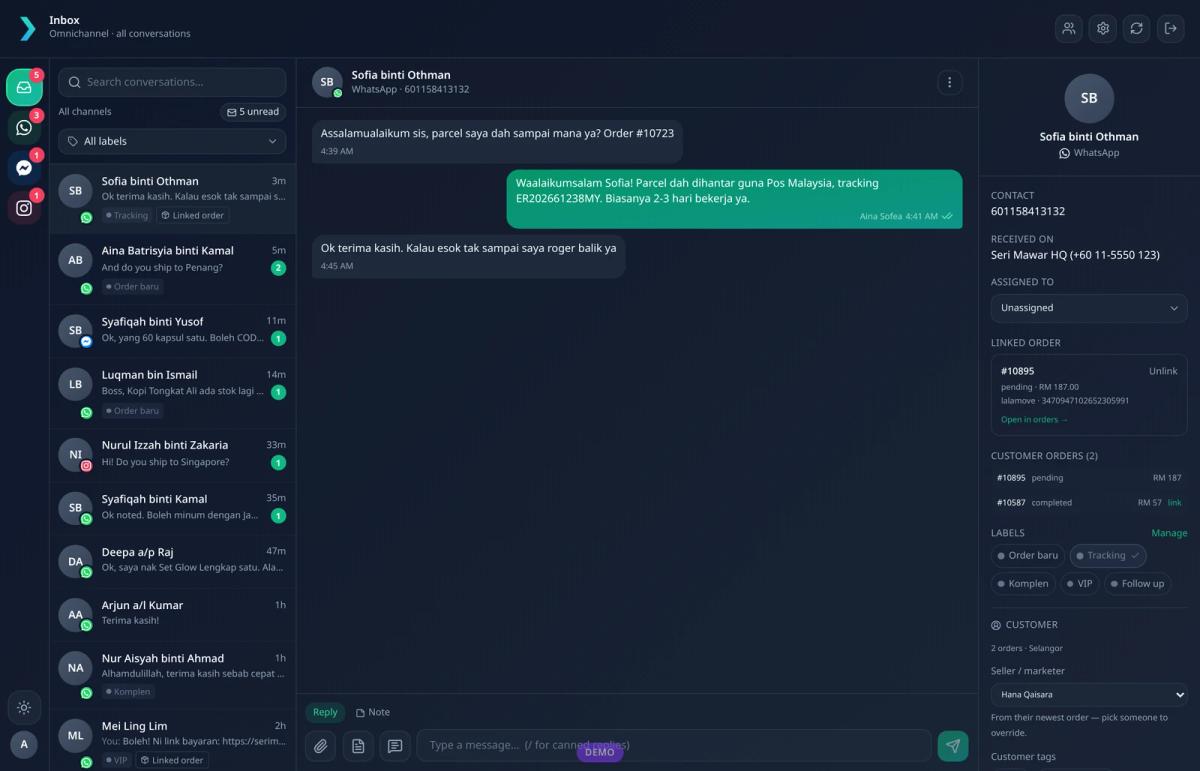
In Luxana, the inbox brings WhatsApp together with Messenger and Instagram chats. The side panel shows the linked order with its courier and tracking number, all of the customer’s orders, labels, the assigned team member and the seller or marketer responsible for that customer.
3. Segments built from real purchase data
Good segments are built from what customers actually did, not from tags someone remembered to type. Useful segments for an online store include:
- Repeat buyers who have ordered more than once
- VIP customers with the highest total spend
- At-risk customers who used to buy regularly but have not ordered in a while
- Buyers of a specific product, for restock alerts or matching add-ons
- Recent buyers whose last order was within a set number of days
When the CRM sits on top of your order data, these segments update themselves. Nobody has to export a list, clean it in a spreadsheet and upload it again.
4. Template broadcasts with delivery and read tracking
On the official WhatsApp Business Platform, messages that your business starts (rather than replies to) must use a message template approved by Meta, and you should only message people who have agreed to hear from you. A WhatsApp CRM should make this easy: pick a segment, choose an approved template, schedule it, and see how many messages were delivered and read.
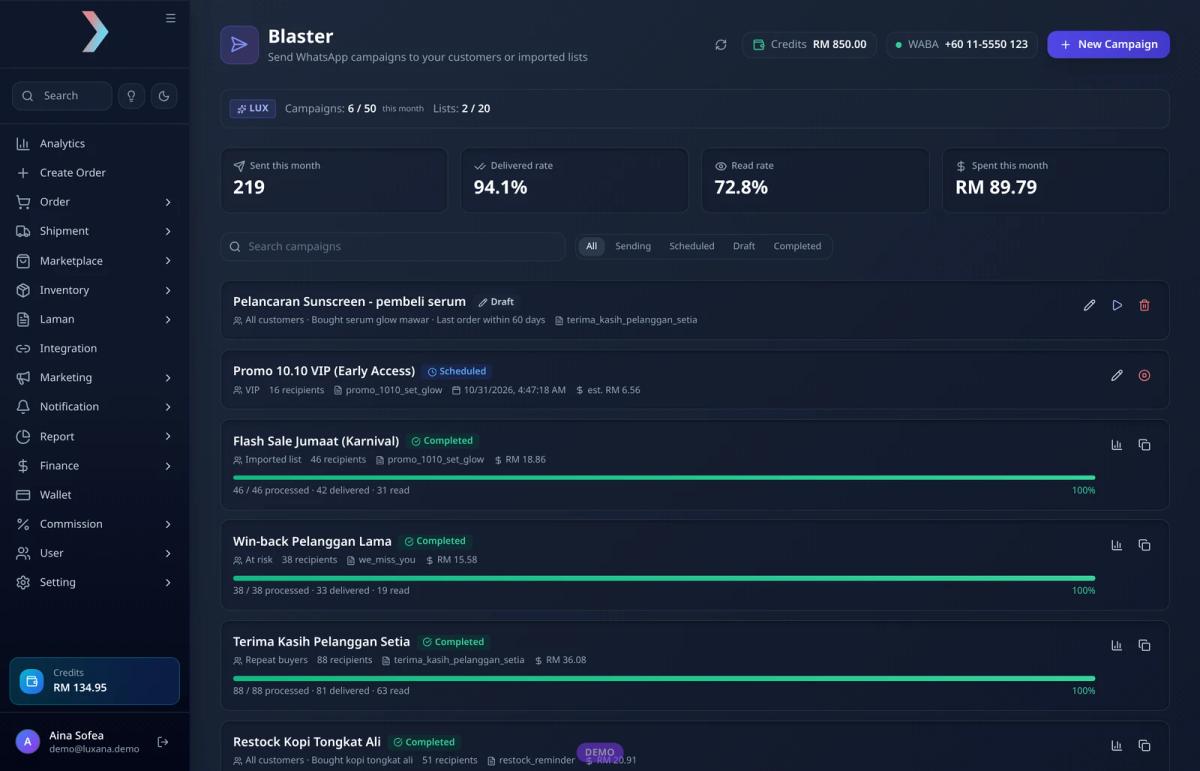
Meta charges for template messages based on the message category and the customer’s country, and pricing can change, so always check the current rates with Meta or your provider before planning a large campaign. A CRM that shows an estimated cost before you send helps you avoid surprises. For tips on keeping your number healthy, read cara blast WhatsApp tanpa kena ban.
5. Automated follow-ups
The best WhatsApp messages are often the ones nobody has to remember to send. Order confirmations, shipping updates with tracking links and delivery notices can be triggered by order events. After-sales messages, such as a usage tip a few days after delivery or a reminder when a product is likely to run out, help bring customers back. We cover the setup in detail in our guide to WhatsApp order notifications and in follow up WhatsApp untuk repeat order.
Standalone WhatsApp CRM vs a CRM built into your OMS
There are two main ways to get a WhatsApp CRM. You can use a standalone WhatsApp tool and connect it to your store, or you can use an order management system (OMS) that already has a WhatsApp CRM built in. Both can work, but they lead to very different daily routines.
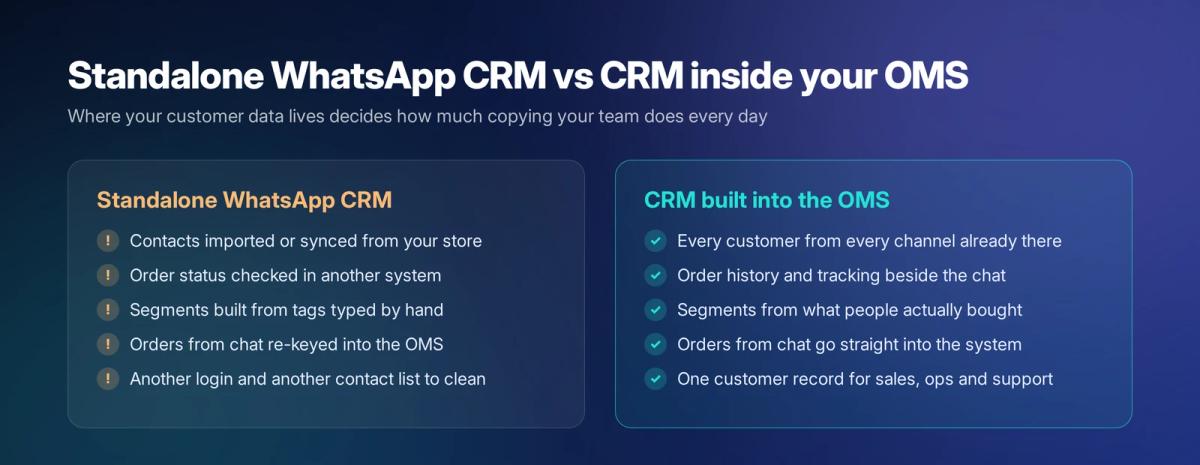
With a standalone tool, customer data usually has to be imported or synced from somewhere else, and order details still live in another system. With a CRM built into the OMS, every customer from every sales channel is already there, with their orders, payments and deliveries attached. Segments come straight from purchase history, and orders taken in chat go straight into the same system that packs and ships them.
How to set up a WhatsApp CRM for your online store
Setup steps
- Connect your business number to the official WhatsApp Business Platform through your CRM or provider, and verify your business with Meta.
- Bring your customers in from every sales channel so each person has one record with their order history.
- Set up the shared inbox: add team members, decide who handles which chats, and create labels and canned replies for common questions.
- Create and submit message templates for order updates, follow-ups and promotions, and wait for Meta's approval.
- Build your first segments, such as repeat buyers and recent buyers, and record who has opted in to promotional messages.
- Turn on automated order notifications first, then start small campaigns to one segment at a time and review delivery and read rates.
- Review the numbers each month: response times, repeat purchase rate and which campaigns led to orders.
Common mistakes to avoid
- Blasting every contact with the same promotion. It annoys customers, invites blocks and reports, and can lower your number’s quality rating.
- Messaging people who never opted in. Keep a clear record of consent and honour opt-outs quickly.
- Using unofficial automation tools. Cheap in the short term, risky for your number and your customer list.
- Keeping order data somewhere else. If the team has to switch systems to answer basic questions, response times suffer.
- Treating WhatsApp only as support. Use your purchase data to plan follow-ups and repeat orders as well.
Frequently asked questions
Is a WhatsApp CRM the same as the WhatsApp Business app?
No. The WhatsApp Business app is a free app for small businesses, used on a phone. A WhatsApp CRM is software, usually built on the official WhatsApp Business Platform, that lets a team share one number, keep customer records and send approved messages at scale.
Do I need the WhatsApp Business API for a WhatsApp CRM?
For a team inbox, broadcasts to segments and automated notifications, you will normally need the official WhatsApp Business Platform. Most WhatsApp CRMs connect to it for you, so you do not have to build anything yourself.
How much does a WhatsApp CRM cost?
There are usually two parts: the CRM or software subscription, and Meta’s charges for template messages, which depend on the message category and the customer’s country. Check the current pricing with Meta and your provider, as it can change.
Can I take orders through a WhatsApp CRM?
Yes, if it is connected to your order system. In Luxana, your team can turn a chat into an order without retyping the customer’s details, for example with AI Paste, and the order then flows into packing and shipping in the same system.
Keep WhatsApp, customers and orders in one place
Luxana is a Malaysian order management system (OMS) with a CRM and official WhatsApp Business Platform integration built in. Your team answers chats in one shared inbox, sees each customer’s orders and tracking beside the conversation, and sends approved messages to segments built from real purchase history, without exporting a single contact. If your team is still juggling phones and spreadsheets to keep up with WhatsApp, see how Luxana works.
Read also: WhatsApp Order Notifications: Automate Order Updates | Order Management System Malaysia: Manage All Your Sales Channels in One Place | CRM untuk Bisnes Online: Satukan Data Pelanggan dan Order

Run orders, couriers and WhatsApp in one place
Built for Malaysian online sellers. Set up in an afternoon.


