WhatsApp Order Notifications: How to Automate Order Updates for Your Online Store (2026)
A practical guide for Malaysian online sellers: which WhatsApp order notifications to send, ready-to-adapt templates, Meta’s Oct 2026 pricing update (utility templates no longer free in the 24h window), and two ways to automate order updates.
- Published
- Updated
- Reading time
- 14 min read
- Language
- English

On this page 9 sections
- What is a WhatsApp order notification?
- The order notifications every online store should send
- How to write WhatsApp order templates that work
- How WhatsApp pricing affects order notifications (updated Oct 2026)
- What is still free
- Two ways to automate WhatsApp order notifications
- Option 1: Your own number with Meta WhatsApp Business
- Option 2: Lux Notify, the managed service
- After delivery: turn notifications into repeat orders
- Common mistakes to avoid
- Frequently asked questions
- Send every order update automatically, from one system
A customer places an order, then waits. Did the payment go through? Has it shipped? Which courier? When will it arrive? If your store doesn’t tell them, they message your admin to ask, and your team spends the day answering “where is my order” instead of selling.
WhatsApp order notifications fix this. Each time an order changes status, the customer gets a short WhatsApp message with exactly what they need: an order confirmation, a COD reminder, a tracking number, a heads-up that the parcel is out for delivery. This guide explains which notifications matter, how to write templates that work, how WhatsApp pricing affects your messages after Meta’s 1 October 2026 update, and how to automate the whole thing for an online store in Malaysia.
What is a WhatsApp order notification?
A WhatsApp order notification is an automated message sent to a customer when something happens to their order. It is triggered by a status change in your order system, not typed by an admin. In Malaysia, where most customers already talk to sellers on WhatsApp, it is usually the channel they read first, ahead of email or SMS.
To send these messages automatically and at scale, you need the official WhatsApp Business API (the WhatsApp Business Platform from Meta). Messages go out using templates that Meta approves in advance. Sending order updates from a personal number or an unofficial blasting tool risks getting the number restricted. Our WhatsApp Business API Malaysia guide covers how the official API works, and WhatsApp CRM explains how those messages sit inside a proper customer inbox.
Order notifications are one piece of a broader fulfilment flow. When packing, courier and tracking are already organised, the same status changes that move a parcel can also fire the right WhatsApp update. See E-commerce Order Fulfillment in Malaysia for the end-to-end picture.
The order notifications every online store should send
You don’t need a message for every tiny event. These are the moments where a WhatsApp update saves the most questions and prevents the most problems:
| Order status | What to tell the customer | Why it matters |
|---|---|---|
| New order / confirmed | Order number, items, total, what happens next | Reassures the customer the order went through and stops duplicate orders |
| Pending COD | Order is confirmed and how much cash to prepare | Reduces COD rejections at the door |
| Payment received (bank transfer) | Payment received and when it will ship | Stops the "did you get my payment?" messages |
| In transit / shipped | Courier, tracking number and tracking link | Removes most "where is my order" questions |
| Out for delivery | Parcel arrives today, keep your phone on | Fewer missed deliveries and failed attempts |
| Failed delivery | The courier tried, please confirm address or time | Saves the parcel before it becomes a return |
| Completed / delivered | Thank you, hope you like it, how to get help | Opens the door to reviews and repeat orders |
| Returned | Parcel came back, reply to arrange a resend | Recovers a sale you would otherwise lose |
Failed-delivery and return messages matter more than many sellers expect. A quick WhatsApp that asks the customer to confirm the address or arrange a resend often saves a parcel that would otherwise bounce back. For the operational side of that problem, see Parcel gagal dihantar.
How to write WhatsApp order templates that work
Because API messages use pre-approved templates, you write each message once with placeholders, and your system fills in the details for every order. A good order template is short, specific and tells the customer what to do next. For approval rules, category labels and common rejection reasons, use our deeper guide: Template mesej WhatsApp.
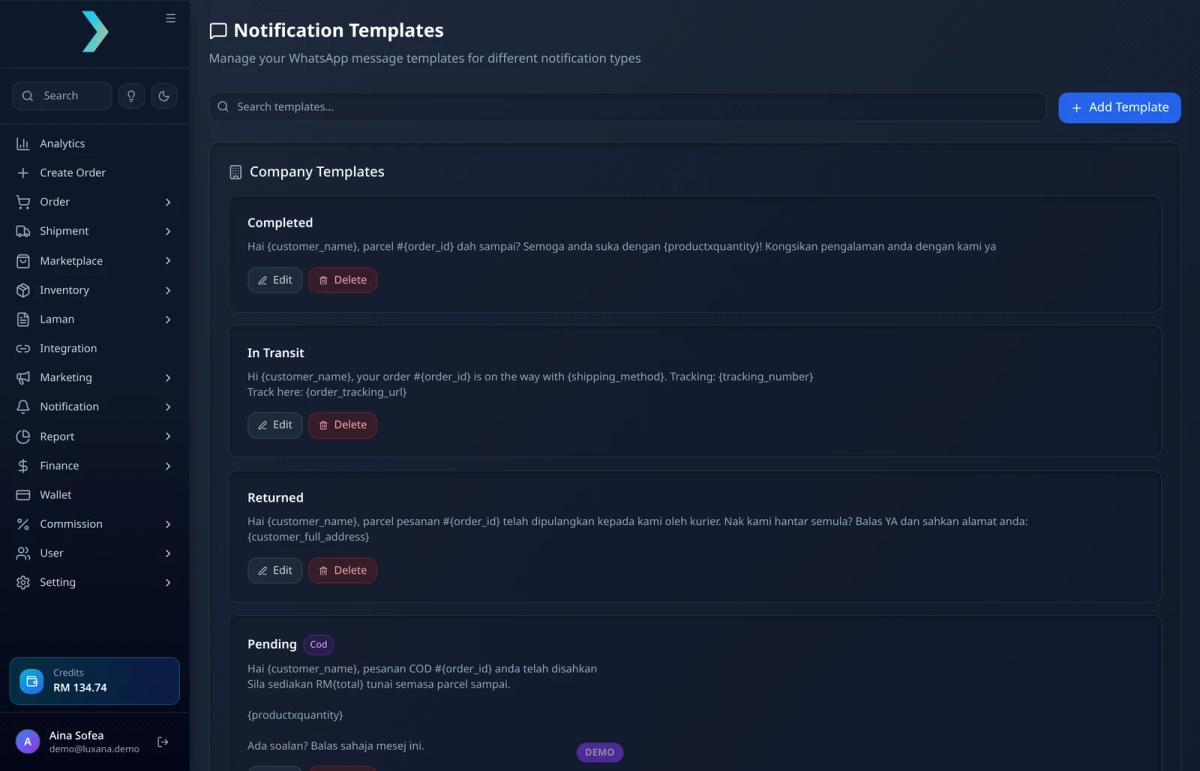
Here are template examples you can adapt. The words in curly brackets are placeholders filled in from the order:
- Order confirmed: “Hi {customer_name}! Your order #{order_id} is confirmed and being packed. {productxquantity}. Total: RM{total}. We’ll WhatsApp your tracking number as soon as it ships.”
- Pending COD: “Hi {customer_name}, your COD order #{order_id} is confirmed. Please prepare RM{total} in cash when the parcel arrives. Any questions? Just reply to this message.”
- Shipped: “Hi {customer_name}, your order #{order_id} is on the way with {shipping_method}. Tracking: {tracking_number}. Track here: {order_tracking_url}”
- Returned: “Hi {customer_name}, your parcel for order #{order_id} was returned to us by the courier. Would you like us to resend it? Reply YES and confirm your address: {customer_full_address}”
Template checklist
- Use the customer's name and the order number
- Say exactly what happened (confirmed, shipped, out for delivery)
- Include the one detail they need: total, COD amount or tracking link
- Tell them what to do next, even if it is just "reply if you have a question"
- Keep it to a few lines; this is an update, not a promotion
- Write in the language your customers use; many Malaysian stores keep Malay and English versions
- Submit the template under Utility, not Marketing, if it is a pure order update
Keep order updates factual. Once you add promotions or discount codes, Meta treats the template as marketing instead of utility, which costs more and is more likely to be ignored or blocked by the customer. That category line is also where many approval delays start — template mesej WhatsApp walks through how Meta decides.
How WhatsApp pricing affects order notifications (updated Oct 2026)
Meta charges the WhatsApp Business Platform per delivered message, and the rate depends on the message category and the customer’s market. Malaysia is a named market on Meta’s rate card. Order notifications almost always use utility templates (confirmations, shipping updates, delivery alerts). Marketing templates (promotions, offers, re-engagement) cost more. Authentication templates are for OTPs and similar codes.
On 1 October 2026 (by Messaging account timezone), Meta changed a rule that many Malaysian sellers still quote incorrectly. Before that date, utility templates sent inside an open 24-hour customer service window were free. That free ride ended. Utility templates are now charged at the utility rate even when the 24-hour window is open.
| Rule | Before 1 Oct 2026 | From 1 Oct 2026 |
|---|---|---|
| Utility template inside open 24h service window | Free | Charged at the utility rate for that market |
| Utility template outside the 24h window | Charged at utility rate | Still charged at utility rate |
| Marketing template (any time) | Charged at marketing rate | Still charged at marketing rate |
| Free-form service reply inside open 24h window | Free (within policy) | First 1,000 service messages per business phone number per month are free; from the 1,001st, charged at the published service/utility rate for that market |
| Messages in a free entry point (FEP) window | Free for marketing/utility/authentication/service (with Meta's FEP rules) | Still free under FEP rules; Meta Business Agent remains charged in FEP |
What the 24-hour window still controls: when you may send free-form (non-template) replies. A customer message opens the window; each new customer reply resets it. It no longer makes utility templates free. That is the part older blog posts and seller tips often get wrong.
What is still free
- Service (free-form) messages inside an open 24-hour window: the first 1,000 per business phone number per month are free (no rollover). From the 1,001st, Meta charges at the published service/utility rate for that market.
- Free entry point (FEP) window messages: when a user messages you via a Click-to-WhatsApp ad or another supported entry point, Meta can keep an FEP window open for up to 7 days. Marketing, utility, authentication and service messages in that FEP window follow Meta’s free-entry rules. Meta Business Agent messages are still charged in FEP.
- Non-delivered messages are not charged — Meta bills on delivered messages.
Practical takeaway for order notifications: plan to pay the utility rate for every delivered order template — confirmation, shipped, out for delivery, failed delivery — whether or not the customer has replied recently. Use the 24-hour window for real two-way support (clarifying an address, answering a product question), not as a way to make templates free. Keep templates lean so you only send the statuses that reduce WISMO and failed deliveries.
Two ways to automate WhatsApp order notifications
Broadly, you can connect your own WhatsApp Business API number, or use a managed service that sends from a provider’s official number. Here is how they compare:
| Your own WhatsApp Business API number | Managed notification service | |
|---|---|---|
| Sender | Your brand's own number | The provider's official WhatsApp number |
| Setup | Meta business verification, number setup, template approval | Little or no setup; top up credits and switch it on |
| Templates | You write and get your own templates approved | Provided and managed by the service |
| Two-way chat | Customers can reply to your number and your team answers | Mainly one-way updates |
| Best for | Brands that want their own number, custom messages and a sales inbox | Sellers who just want order updates running quickly |
Luxana supports both, and because the CRM is built directly into the OMS, every message is tied to the actual order and customer record instead of living in a separate app. That is the same idea behind a proper CRM untuk bisnes online: one customer history, not scattered chats.
Option 1: Your own number with Meta WhatsApp Business
In Luxana’s Meta WhatsApp Business integration you connect one or more of your own WhatsApp numbers as providers, for example a main HQ number and a customer care number. You then decide which order events send a message.
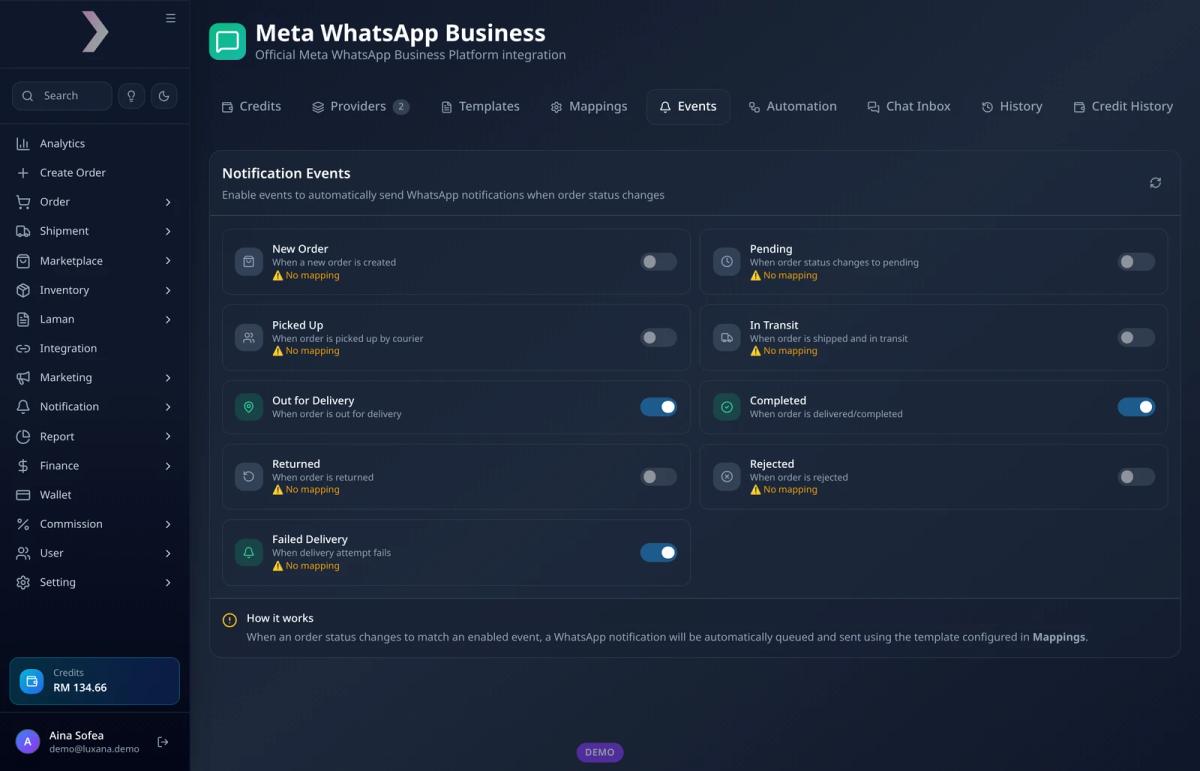
How it is set up
- Connect your WhatsApp Business number as a provider
- Create your templates and get them approved by Meta
- Map each order status to a template, either for all payment methods or a specific one such as COD
- Switch on the events you want: New Order, Pending, Picked Up, In Transit, Out for Delivery, Completed, Returned, Rejected or Failed Delivery
- Let it run: when an order changes to an enabled status, the message is queued and sent automatically
Because customers can reply to your own number, the same integration also gives you a chat inbox and keyword auto-replies. For example, a customer who types “tracking” or “where is my order” can get an instant reply that explains how to check their parcel status, while an admin follows up if needed. That reply is a service message inside the open window — useful for support, and no longer a loophole for free utility templates.
Option 2: Lux Notify, the managed service
If you don’t want to set up your own API number, Lux Notify sends order updates from Luxana’s official WhatsApp number. There are no templates to get approved: you top up credits and switch on the notifications. It is priced per message with a small top-up — check the current rate inside Luxana rather than relying on an old figure. It currently covers New Order and In Transit notifications, with more statuses listed as coming soon.
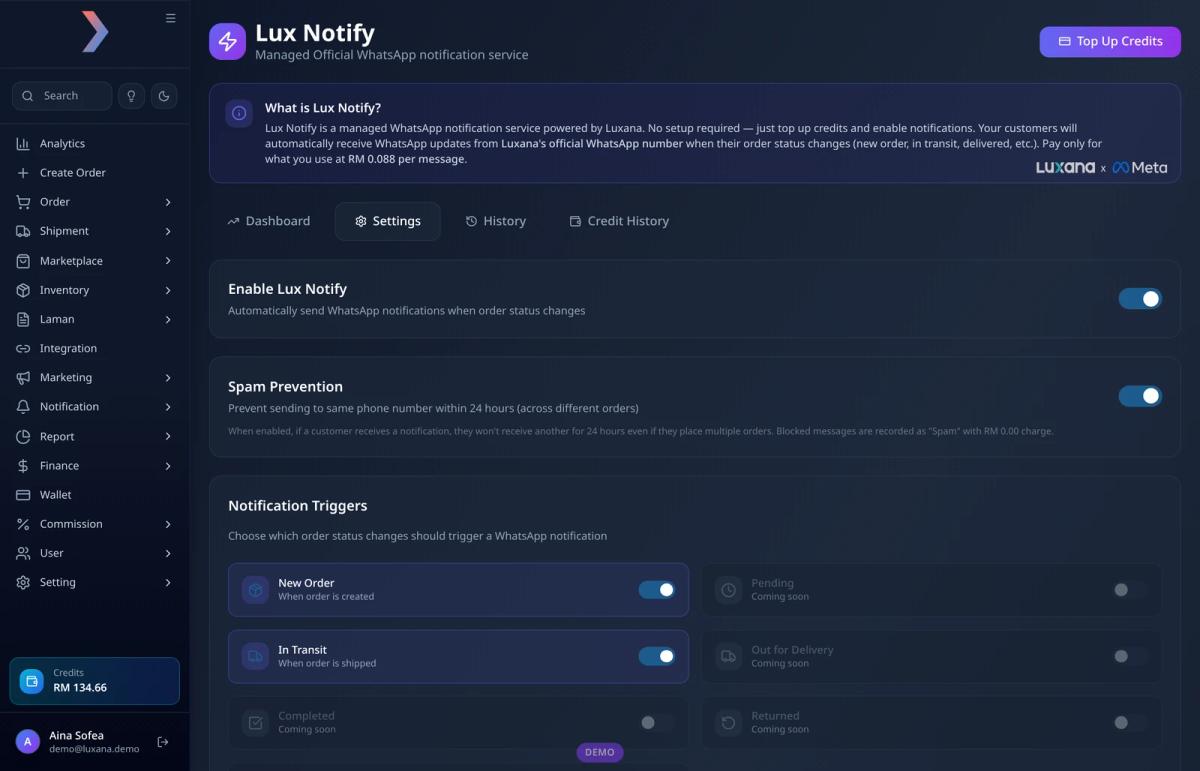
Two settings are worth knowing about. Spam prevention stops the same phone number from receiving another notification within 24 hours, even across different orders, so a customer who orders three times in a day doesn’t get flooded. Resend missed notifications finds orders that were missed, for example while notifications were switched off, and lets you send them again.
After delivery: turn notifications into repeat orders
The “delivered” message shouldn’t be the last time a customer hears from you. Luxana’s Aftercare flows check in with customers on set days after an order is completed, for example a review request a few days later and a repeat-order reminder when a product is likely to run out. A flow stops by itself when the customer orders again or the order is returned. We explain this approach in more detail in our guide to WhatsApp follow-ups for repeat orders.
Remember the pricing split: a factual “how is the product” check-in may still need a marketing or carefully scoped utility template depending on Meta’s category rules. Don’t slip a discount code into a delivery update just to “reuse” a free feeling — after Oct 2026 that utility update is billed either way, and a promo line can reclassify the template as marketing.
Common mistakes to avoid
- Sending updates from a personal number. It doesn’t scale, can’t be automated safely and puts the number at risk. Unofficial blasting tools have the same problem — see cara blast WhatsApp tanpa kena ban for why official channels matter.
- Mixing promotions into order updates. It changes the template category, costs more and annoys customers who only wanted their tracking number.
- Budgeting as if utility templates were still free inside the 24h window. From 1 Oct 2026 they are charged. Plan utility volume into your Meta bill.
- Too many messages. Notify on the statuses that matter, not every internal step. Extra delivered utility templates add cost without reducing WISMO.
- Sending without checking the phone number. A wrong number means no notification and often a failed delivery. Capturing orders accurately, for example with AI Paste, fixes this at the source.
- Ignoring failed messages. Check your notification history for failures and fix bad numbers. A failed delivery attempt that gets no message is how parcels end up as returns; see how to save failed deliveries.
Frequently asked questions
Can I send WhatsApp order notifications without the WhatsApp Business API?
You can send messages manually from the WhatsApp Business app, but you can’t automate them safely at scale. Automated notifications triggered by order status need the official WhatsApp Business API or a service built on it.
Are WhatsApp order notifications free?
Usually not. Meta charges per delivered template message. Utility templates (the right category for order updates) are cheaper than marketing, but as of 1 October 2026 they are charged even inside an open 24-hour customer service window. What can still be free: the first 1,000 service (free-form) messages per business phone number per month inside the 24h window, and messages that fall under Meta’s free entry point (FEP) rules. Always confirm against Meta’s official pricing page.
What changed in Meta’s WhatsApp pricing on 1 October 2026?
The main change for order notifications: utility templates are no longer free inside the customer service window. They bill at the utility rate whenever they are delivered. Meta also clarified the monthly free allowance for service messages (1,000 per business phone number, no rollover) and kept FEP free-entry rules for supported ad/entry conversations. The 24-hour window still decides when free-form replies are allowed; it no longer waives utility template fees.
Which notification reduces “where is my order” questions the most?
The shipped message with the courier name, tracking number and tracking link. Adding an out-for-delivery message on the day itself also helps customers be ready to receive the parcel.
Should order notifications be in Malay or English?
Use the language your customers order in. Many Malaysian stores keep templates in both, and Meta lets you register the same template in more than one language.
Do I still need customers to reply to my order messages?
Yes — for support, not for free templates. A reply opens or refreshes the 24-hour window so your team can send free-form clarifications (within the monthly service allowance). It does not make the next utility shipping update free.
Send every order update automatically, from one system
Luxana is a Malaysian order management system (OMS) that brings orders, stock, couriers, AWBs, packing and an official WhatsApp CRM into one place. If your admins still copy tracking numbers into WhatsApp one by one, try Luxana and let order updates go out on their own — with templates and pricing rules that match how Meta bills today.
Read also: Template mesej WhatsApp | WhatsApp Business API Malaysia | WhatsApp CRM | CRM untuk Bisnes Online | Follow Up WhatsApp untuk Repeat Order | E-commerce Order Fulfillment in Malaysia

Run orders, couriers and WhatsApp in one place
Built for Malaysian online sellers. Set up in an afternoon.


