E-commerce Order Fulfillment in Malaysia: The Complete Guide (2026)
A complete, step-by-step guide to e-commerce order fulfillment for Malaysian sellers who ship in-house: from order capture and stock to courier routing, batch AWB, packing scans, handover and returns.
- Published
- Reading time
- 13 min read
- Language
- English

On this page 16 sections
- What is order fulfillment in e-commerce?
- Why fulfillment gets harder as you grow
- Common fulfillment problems and how to fix them
- Step 1: Capture every order in one place
- Step 2: Verify the address and payment type
- Step 3: Keep stock accurate in real time
- Step 4: Choose the right courier automatically
- How to compare couriers in Malaysia
- Step 5: Push orders and print AWBs in batches
- Step 6: Pick, pack and scan every parcel
- Step 7: Hand over to the courier with a manifest
- Step 8: Track delivery, update customers and handle returns
- Fulfillment metrics worth tracking
- In-house fulfillment vs a 3PL
- What a better process looks like in practice
- Frequently asked questions
- Run your whole fulfillment process from one system
Getting the order is only half the job. The other half happens after the customer pays: checking the address, making sure the stock is really there, picking a courier, printing the AWB, packing the right items and handing everything over before pickup. That whole chain is order fulfillment, and for most Malaysian online sellers it is where the time, the mistakes and the returns come from.
This complete guide walks through e-commerce order fulfillment in Malaysia step by step, for sellers who pack and ship from their own office, store or warehouse. You will see what goes wrong at each stage, what a good process looks like, which numbers to watch, and when it makes sense to move from spreadsheets to an order management system (OMS).
What is order fulfillment in e-commerce?
Order fulfillment is everything that happens between a customer placing an order and that customer receiving the parcel. For a seller shipping in-house, it usually covers eight stages:
The 8 stages of order fulfillment
- Capture the order from every channel into one list
- Verify the address, phone number and payment type (COD or paid)
- Reserve and deduct stock so you never sell what you don't have
- Choose the right courier for each order
- Push orders to the courier and print AWB labels in batches
- Pick, pack and scan every parcel
- Hand over to the courier with a manifest
- Track delivery, update the customer and process returns
Each stage depends on the one before it. A wrong address at stage 2 becomes a failed delivery at stage 8. A stock count that is off at stage 3 becomes a cancelled order and an unhappy customer. That is why fixing fulfillment is rarely about one tool; it is about making the whole chain run from the same data.
Why fulfillment gets harder as you grow
At 20 orders a day, one person with a notebook and a few marketplace tabs can keep up. At a few hundred orders a day across a website, WhatsApp and several marketplaces, the same manual process starts to break:
- Orders live in too many places. Website orders, marketplace orders and orders typed in from WhatsApp chats all sit in different dashboards.
- Sorting by courier is done by hand. Someone decides parcel by parcel which courier it goes to.
- Labels are printed out of order. AWBs come out in a random pile and have to be matched to parcels.
- Nobody knows what has actually been packed. An order can be pushed to the courier and still be sitting on a shelf at pickup time.
- Stock is updated later, if at all. Returns come back and nobody adds them back to stock.
None of these are unusual. They are simply what happens when volume grows faster than the process. If you are wondering whether your team has reached that point, our guide on when to move from Excel to an OMS covers the warning signs.
Common fulfillment problems and how to fix them
| Stage | What usually goes wrong | What a good process looks like |
|---|---|---|
| Order capture | Orders scattered across channels and chats | All channels synced into one order list |
| Verification | Incomplete addresses, wrong phone numbers | Details checked before the order is pushed |
| Stock | Overselling, returns not added back | Stock deducted by orders and updated on returns |
| Courier choice | Manual sorting, parcel by parcel | Rules assign a courier automatically |
| AWB printing | Labels printed one by one or out of order | Orders pushed and AWBs downloaded per batch |
| Packing | Wrong item, missed parcels | Every parcel scanned and tracked |
| Handover | Parcel count doesn't match | Manifest checked at pickup |
| After delivery | Customers chasing for updates, returns ignored | Status updates sent and returns recorded |
Step 1: Capture every order in one place
Fulfillment starts with knowing exactly what needs to ship today. If your team is copying orders from one dashboard into another, or from WhatsApp into a spreadsheet, every copy is a chance for a typo.
An OMS pulls orders from your sales channels into one list, so the packing team works from a single source of truth. Luxana syncs orders from channels like WooCommerce, Shopify and the major marketplaces into one dashboard, which we explain in how to sync orders into one dashboard. For orders that come in through WhatsApp chats, AI Paste fills in the customer name, phone number and address from a pasted message, so nobody has to retype them.
Step 2: Verify the address and payment type
Many failed deliveries start with small data problems: a missing unit number, a wrong postcode, a phone number with one digit missing. Catching these before the parcel leaves is far cheaper than paying for a return trip. Our article on reducing return parcels goes deeper into the causes.
Quick verification checklist before you push an order
- Full address with unit or house number, street, postcode and state
- A phone number the courier can actually reach
- Payment type confirmed: COD, bank transfer or already paid
- COD amount correct, if it's a COD order
- Any special notes (fragile, frozen, gift) visible to the packer
COD orders deserve extra care because the parcel has to travel twice if the customer refuses it. Some sellers send a quick confirmation message before shipping COD orders for exactly this reason.
Step 3: Keep stock accurate in real time
Fulfillment falls apart when the system says you have 10 units and the shelf has 2. Good stock control means three things: stock is deducted when orders come in, returned items are added back, and low-stock items are flagged before they run out.
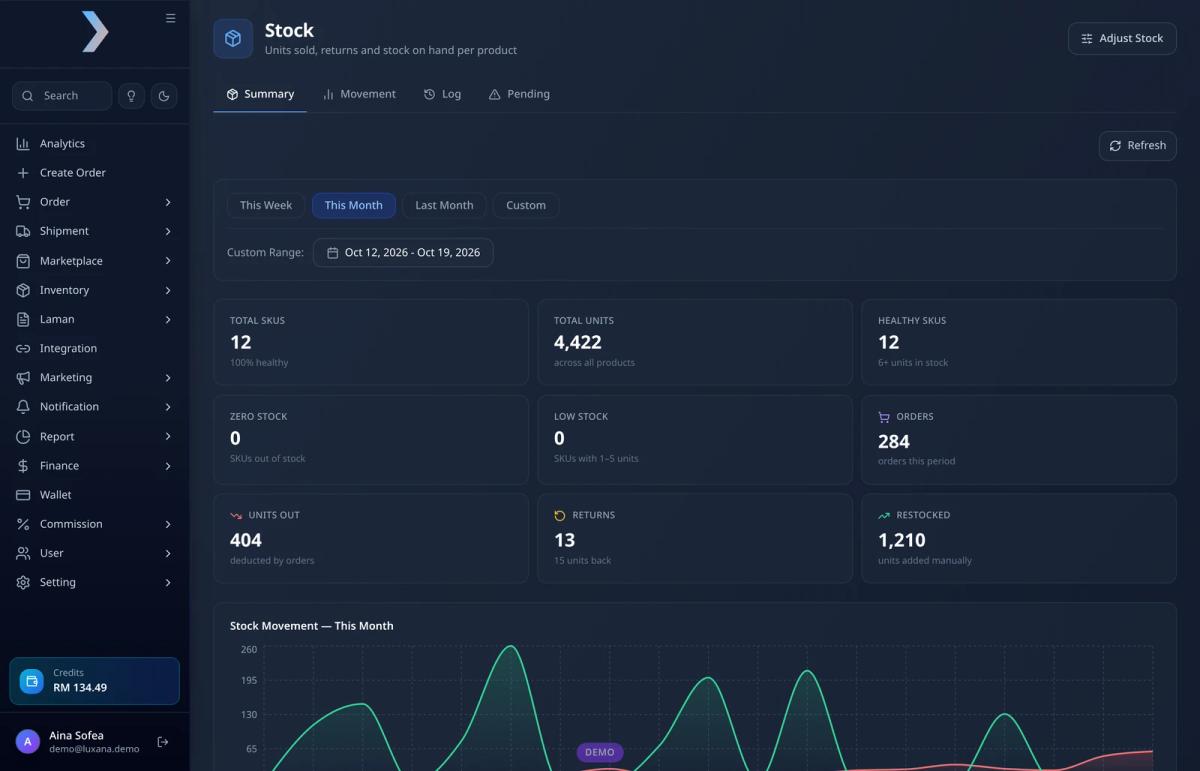
In Luxana, the Stock page summarises units deducted by orders, units returned, units restocked and how many SKUs are healthy, low or out of stock, with a movement chart, a log and a pending view. Because stock lives in the same system as orders, it moves when orders move, without anyone updating a separate sheet.
Step 4: Choose the right courier automatically
Malaysian sellers often use more than one courier: one that is strong in East Malaysia, one that is cheaper for light parcels, one for same-day delivery in the Klang Valley. The problem is that deciding which courier each order goes to is slow when it’s done by hand.
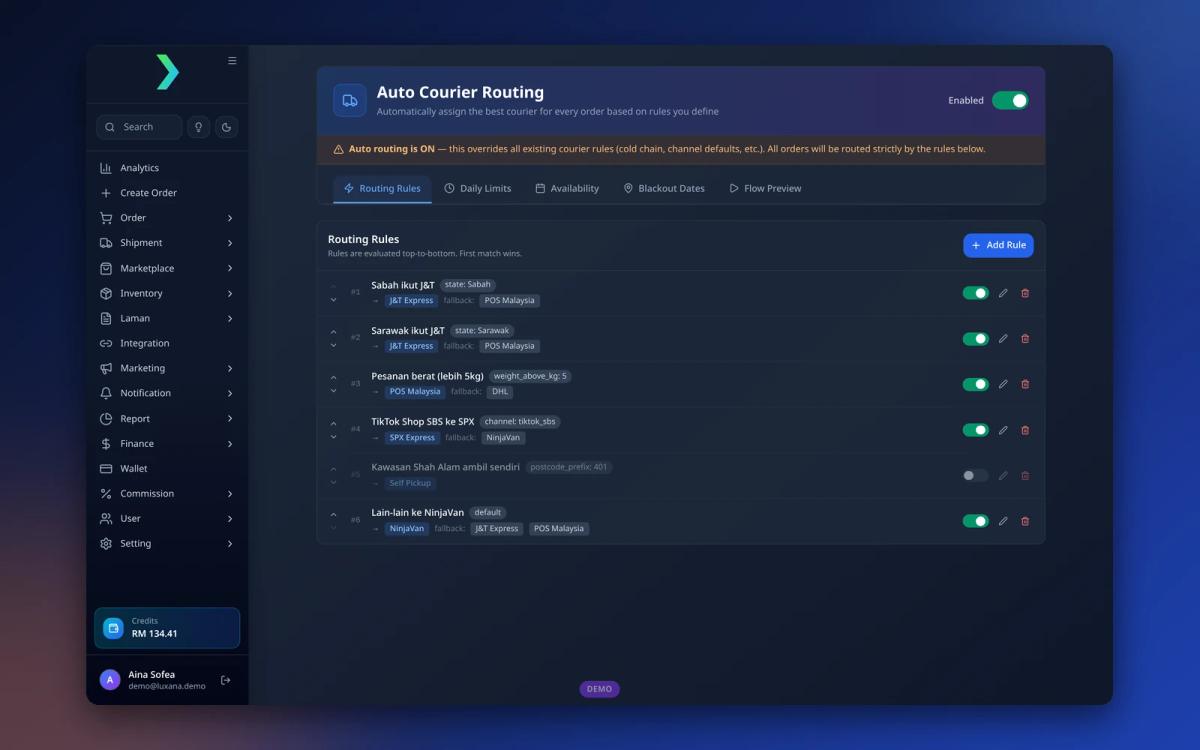
Rule-based courier routing solves this. You write the rules once and the system applies them to every order. In Luxana’s Auto Courier Routing, rules are checked from top to bottom and the first match wins. You can route by:
- State, for example all Sabah and Sarawak orders to one courier
- Parcel weight, so heavier parcels go to the courier that handles them best
- Sales channel
- Postcode prefix
- A default rule for everything else
Each rule can have a fallback courier, and there are settings for daily limits, courier availability and blackout dates, plus a flow preview to check how orders will be routed before you go live.
How to compare couriers in Malaysia
Courier rates and coverage change often, so compare them on your own recent orders instead of relying on a published price list. Look at:
| Factor | Question to ask |
|---|---|
| Coverage | How well do they serve your top states, including Sabah and Sarawak? |
| Pickup | Do they pick up from your location, and at what time cut-off? |
| COD | Do they support COD, and how quickly is COD money remitted? |
| Weight and size | How do rates change for heavier or bulkier parcels? |
| Speed | What are typical delivery times to your main areas? |
| Failed deliveries | How many attempts do they make, and what does a return cost? |
| Integration | Can orders be pushed and AWBs generated from your system? |
Step 5: Push orders and print AWBs in batches
Printing AWB labels one order at a time is one of the biggest hidden time sinks in fulfillment. Batch processing fixes it: filter today’s pending orders, push them to the courier together, and download all the labels for that batch at once.
With Luxana’s Batch Push, you can filter pending orders by courier, payment type (COD, bank transfer, paid), brand, state and bundle, group them by courier or country, push the batch, and then download the AWBs for the whole batch from Recent Batches. Labels come out already grouped, which makes the next step much faster.
Step 6: Pick, pack and scan every parcel
Packing is where most wrong-item and missed-parcel mistakes happen, especially in the rush before pickup. The single most effective habit is to scan every parcel as it is packed, so the system knows exactly which pushed orders are done and which are still waiting. We cover more packing habits in how to reduce wrong packs and returns (in Malay).
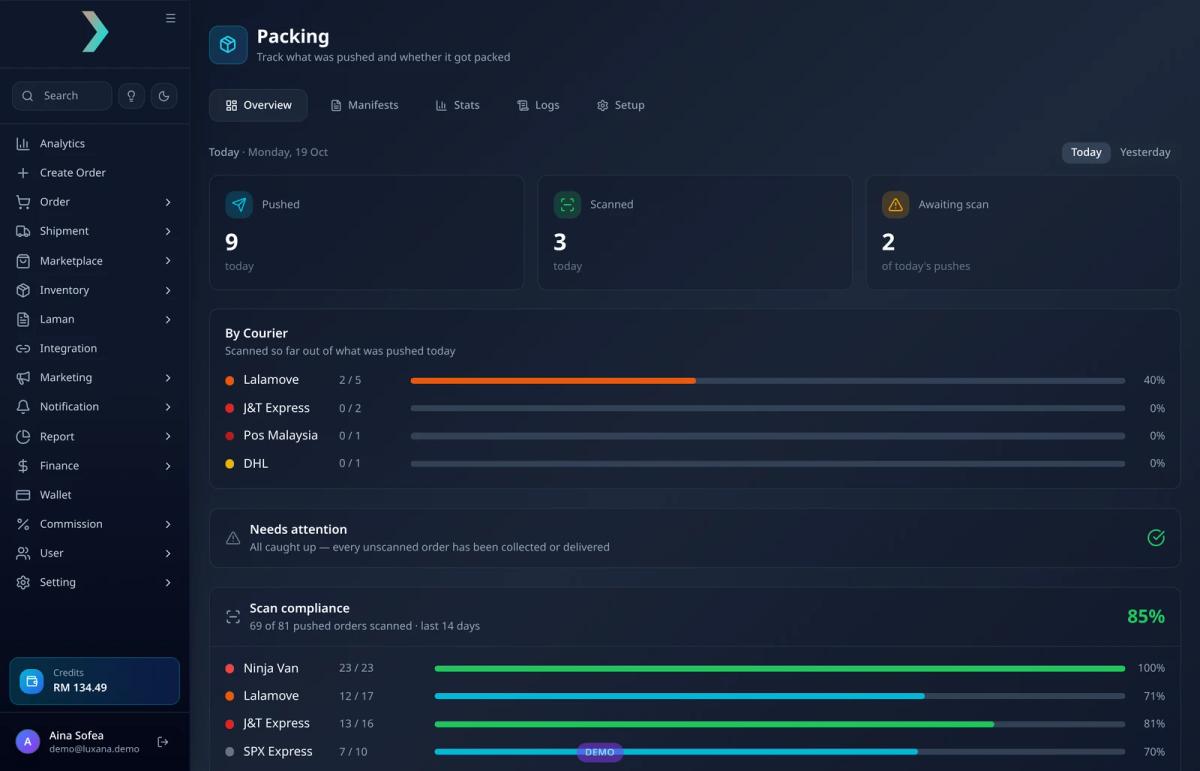
Luxana’s Packing page shows today’s pushed, scanned and awaiting-scan counts, progress by courier, a list of orders that need attention, and scan compliance over the last 14 days, with tabs for manifests, stats, logs and setup.
Step 7: Hand over to the courier with a manifest
Before the courier leaves, the number of parcels handed over should match your records. A manifest makes this a two-minute check instead of an argument a week later. Do a final look at anything that was pushed but not scanned, so no parcel is left behind.
Before courier pickup
- Check orders that were pushed but not scanned
- Make sure no parcel is left behind
- Match the parcel count with the manifest at handover
- Keep the manifest record in case of disputes
Step 8: Track delivery, update customers and handle returns
Fulfillment doesn’t end at handover. Customers who don’t receive updates are more likely to miss the courier’s call or assume the parcel never shipped. Sending order status updates on WhatsApp helps, as long as it is done the right way.
Luxana’s CRM runs on the official WhatsApp Business API and is built directly into the OMS, so customer and order data are already in one place. You can set up automated messages based on order status without exporting contacts to another tool. Read more in our guides to WhatsApp Business API in Malaysia and why customer data belongs in your order system (both in Malay).
For returns, record the reason every time (wrong address, refused COD, wrong item, damaged) and make sure returned units go back into stock. Over a few weeks, the reasons tell you which stage of your fulfillment process needs fixing first. Once the parcel arrives, the same customer data can power follow-up messages for repeat orders.
Fulfillment metrics worth tracking
You don’t need a complicated dashboard. These few numbers, checked weekly, show whether your process is getting better or worse:
| Metric | How to calculate it | What it tells you |
|---|---|---|
| Scan compliance | Parcels scanned ÷ parcels pushed | Whether packing is being tracked properly |
| Same-day ship rate | Orders shipped on the day received ÷ total orders | How fast you turn orders around |
| Return rate | Returned parcels ÷ parcels shipped | How many deliveries fail, and why |
| Wrong-item rate | Wrong-item complaints ÷ parcels shipped | How accurate your packing is |
| Orders per packer | Parcels packed ÷ packers on shift | Whether you can grow without hiring |
| Stock accuracy | Physical count ÷ system count for sampled SKUs | Whether you can trust your stock numbers |
In-house fulfillment vs a 3PL
Some sellers outsource fulfillment to a third-party logistics (3PL) warehouse. Others keep it in-house. Neither is always better:
| In-house fulfillment | 3PL warehouse | |
|---|---|---|
| Control | Full control over packing, inserts and quality | Depends on the 3PL's process |
| Cost structure | Your own staff, space and supplies | Storage, pick-and-pack and other fees |
| Flexibility | Easy to change packaging or add gifts | Changes go through the provider |
| Best for | Brands that want control and already have space and a team | Sellers who want to avoid running a warehouse |
If you keep fulfillment in-house, the process in this guide is what lets a small team handle more orders. If you use a 3PL, you still need clean, verified orders and accurate stock going into it.
What a better process looks like in practice
- 1,000–10,000 — parcels shipped a day
- 3–5 hours — daily sorting before Luxana
- ~15 minutes — daily sorting with Luxana
PAK MAT WESTERN, a frozen food seller using Luxana's Auto Courier Routing, Batch Push and Packing.
Frozen food seller PAK MAT WESTERN ships 1,000 to 10,000 parcels a day. Sorting orders by courier used to take the team 3 to 5 hours every day. With rule-based courier routing, batch AWB printing and packing scans in Luxana, the same sorting now takes about 15 minutes. Read the full story.
If you want to grow order volume without growing headcount at the same pace, our guide on scaling from 100 to 1,000 orders a day without adding staff (in Malay) builds on the same ideas.
Frequently asked questions
What does order fulfillment mean in e-commerce?
It is the full process of getting an order to the customer: receiving and verifying the order, managing stock, choosing a courier, printing the shipping label, picking and packing, handing the parcel to the courier, and handling delivery updates and returns.
What is the difference between an OMS and a WMS?
An order management system (OMS) manages orders from all your sales channels through to shipping: order capture, courier, AWB, packing and customer updates. A warehouse management system (WMS) focuses on what happens inside a warehouse, such as storage locations and bin-level picking. Many small and mid-sized online sellers start with an OMS. Learn more in our guide to order management systems in Malaysia.
How can I ship orders faster without hiring more staff?
Remove the manual steps that don’t need a person: sync orders automatically instead of copying them, let rules choose the courier, push and print AWBs in batches, and scan parcels so nobody has to double-check by hand.
How do I reduce wrong items and missed parcels?
Scan every parcel while packing, check the list of pushed-but-unscanned orders before pickup, and confirm the parcel count with a manifest at handover.
Should I use more than one courier?
Many Malaysian sellers do, because couriers differ in coverage, speed, COD support and pricing for different weights. Using several couriers works best when a system assigns them automatically by rules, so it doesn’t add manual sorting.
Run your whole fulfillment process from one system
Luxana is a Malaysian multichannel order management system with stock, courier routing, batch AWB, packing scans and an official WhatsApp CRM in one place. If your team still spends hours sorting and checking orders every day, try Luxana and see how much of that time you can get back.
Read also: Cara Kurangkan Salah Pack dan Return dalam Gudang Bisnes Online | How to Reduce Return Parcels in Malaysian E-commerce | Cara Scale Bisnes dari 100 ke 1,000 Order Sehari Tanpa Tambah Staff | How Pak Mat Western Sorts Orders in 15 Min

Run orders, couriers and WhatsApp in one place
Built for Malaysian online sellers. Set up in an afternoon.


