Product Bundles for Online Stores: How to Set Up Bundle SKUs and Keep Inventory Accurate (2026)
A practical guide for Malaysian online sellers: types of product bundles, why bundles break stock counts, how to set up bundle SKUs step by step, how to calculate how many sets you can sell, bundle pricing, channel SKU links, packing and returns.
- Published
- Reading time
- 10 min read
- Language
- English

On this page 8 sections
- What is a product bundle?
- Why bundles break your inventory count
- How to set up bundle SKUs step by step
- Step 1: Give every component its own SKU
- Step 2: Create a separate SKU for each bundle
- Step 3: Define the components and quantities
- Step 4: Calculate how many bundles you can sell
- Step 5: Price the bundle so it still makes money
- Step 6: Link the bundle across every sales channel
- Step 7: Pick and pack bundles by component
- How to handle returns and exchanges for bundles
- Bundle setup checklist
- Managing bundles in Luxana
- Frequently asked questions
- Sell more sets without losing track of stock
Bundles are one of the easiest ways to lift your average order value. A skincare set, a 5-pack of coffee at a better price, a raya gift box: customers like the deal, and you move more units per order. The trouble starts in your stock count. Sell a set and forget to take one item out of stock, and a week later you’re promising serum you no longer have.
This guide explains product bundle inventory in plain terms: the main types of bundles, how to set up bundle SKUs, how to work out how many bundles you can actually sell, how to price them, and how to keep packing and returns accurate. It’s written for Malaysian online sellers who sell on several channels at once.
What is a product bundle?
A product bundle is two or more items sold together as one listing at one price. To the customer it’s a single product. To your warehouse it’s still several separate items that need to be picked, packed and counted. Most bundles fall into one of these types:
| Bundle type | Example | What to watch |
|---|---|---|
| Fixed set (kit) | Cleanser + serum + night cream as one skincare set | Every component must be in stock, or the whole set is unavailable |
| Multipack | 5 packs of the same coffee at a lower price | Quantity per bundle matters: one sale takes 5 units out |
| Mix and match | Pick any 3 flavours for RM 75 | Components change per order, so the order must record which items were chosen |
| Gift with purchase | Free pouch with every set | Free items are stock too, and they run out quietly |
Why bundles break your inventory count
Most stock problems with bundles come from the same root cause: the bundle is treated as its own product with its own stock number, separate from the items inside it. That creates three common problems.
- Overselling. You set the bundle stock to 100, but the serum inside it only has 40 left. The bundle keeps selling after the serum runs out.
- Double counting. The same serum is counted once as a single product and again inside the bundle’s stock, so your total looks healthier than it is.
- Stock that doesn’t add up. Staff pack sets from loose stock, but only the bundle count goes down. At stock take the single items are short and nobody knows why.
If you sell the same items on your website, WhatsApp and marketplaces, the problem multiplies, because every channel may be selling the same serum both on its own and inside a set.
How to set up bundle SKUs step by step
Step 1: Give every component its own SKU
Bundles are built from single items, so the single items have to be clean first. Every sellable variation needs its own SKU: the 30ml and 50ml serum are two SKUs, not one. Use a short, readable format that staff can recognise, for example brand, product and size. If your product list isn’t tidy yet, start with our guide on managing stock for an online business, which covers SKU rules in detail.
Step 2: Create a separate SKU for each bundle
Each bundle gets its own SKU, clearly marked as a bundle so nobody mistakes it for a single item. A simple prefix works well: SET-GLOW for a skincare set, SET-KOPI5 for a 5-pack of coffee. Never reuse a component’s SKU for the bundle, and never reuse an old bundle SKU for a new set with different contents, because your sales history will mix the two.
Step 3: Define the components and quantities
List exactly what goes into each bundle and how many of each. A fixed set might be one unit of three different SKUs. A multipack is one SKU with a quantity of five. This list is what turns one bundle sale into the right stock movements and the right items on the packing list.
Step 4: Calculate how many bundles you can sell
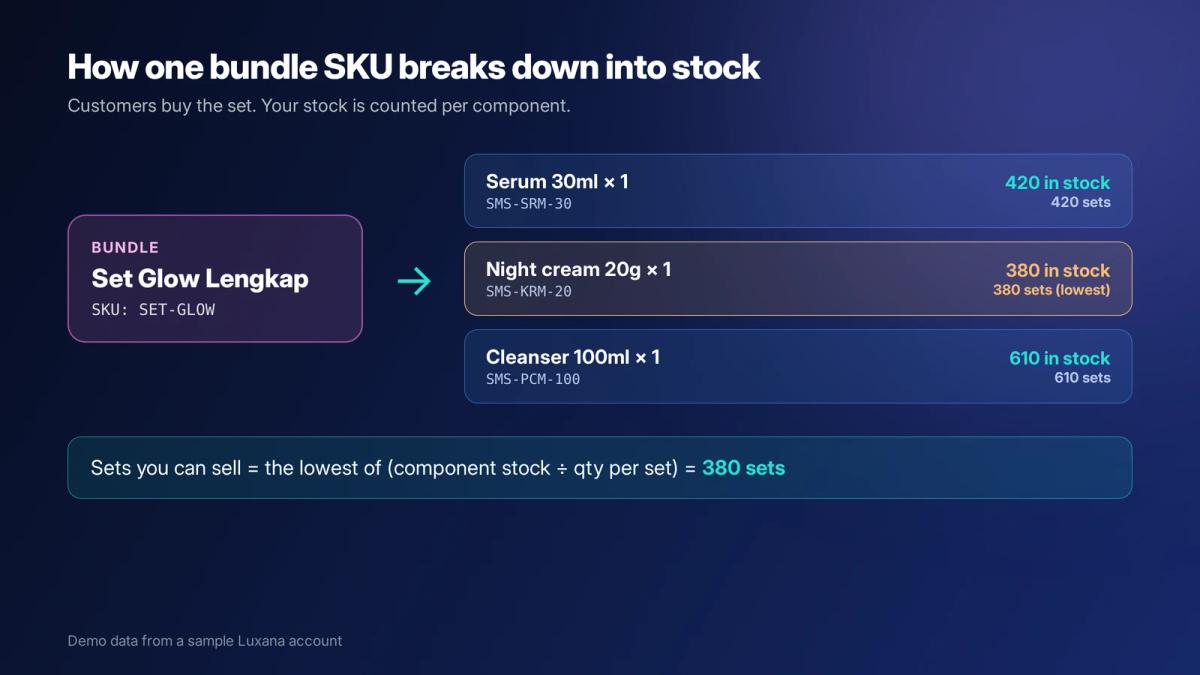
Instead of typing in a stock number for the bundle, work it out from its components. For each component, divide its stock by the quantity needed per bundle, then take the lowest result. That number is how many bundles you can sell right now.
| Component | Stock | Qty per set | Sets possible |
|---|---|---|---|
| Serum 30ml | 420 | 1 | 420 |
| Night cream 20g | 380 | 1 | 380 |
| Cleanser 100ml | 610 | 1 | 610 |
| Set Glow Lengkap (bundle) | 380 (the lowest) |
The same rule works for multipacks. If a coffee 5-pack uses 5 units of a coffee SKU with 640 units in stock, you can sell 128 packs (640 divided by 5). Remember that the components are still being sold on their own too, so the number of sets you can sell drops every time someone buys a single item.
Step 5: Price the bundle so it still makes money
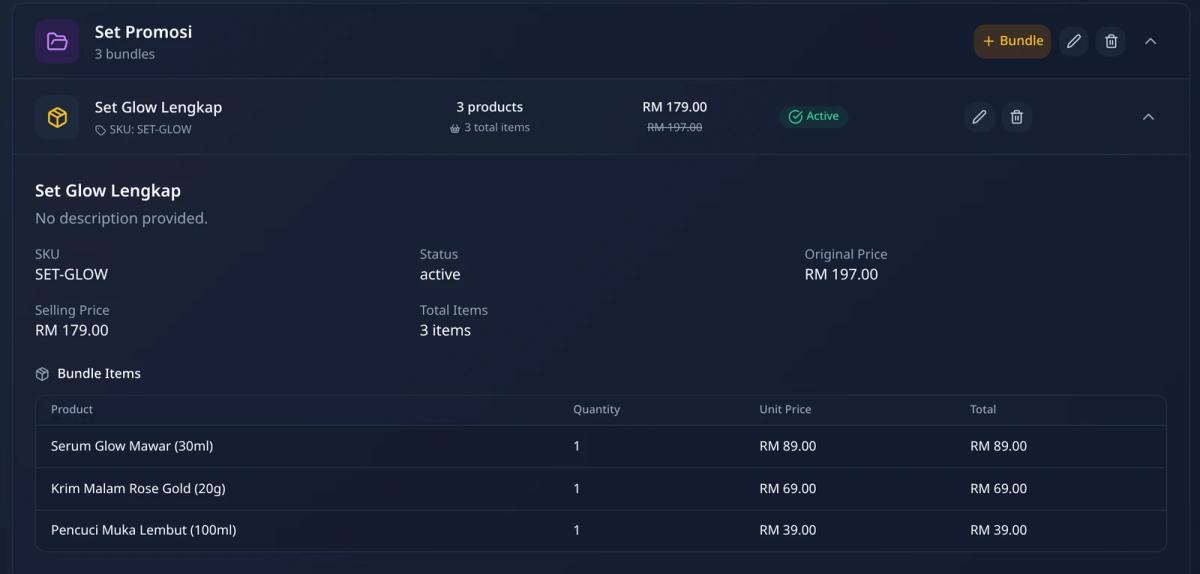
A bundle is usually priced below the sum of its items. In the demo set above, the three items add up to RM 197 and the set sells for RM 179, a discount of RM 18 or about 9%. Before you launch a set, check the bundle against your real costs, not just the item prices:
Bundle pricing check
- Total product cost of all components
- Packaging for the set (a gift box or bigger carton costs more than a flyer)
- Shipping: a bundle is heavier and may move into a higher weight band
- Platform or payment fees on the bundle price
- The discount compared with buying items separately
- Your margin per set after all of the above
If you haven’t worked out these costs before, our guides on calculating net profit for an online business and calculating shipping cost per order walk through each one.
Step 6: Link the bundle across every sales channel
Each marketplace and store gives your listings its own SKU or item ID. If those don’t point back to your master SKUs, orders arrive with codes your warehouse doesn’t recognise, and stock is taken from the wrong item or not at all. Keep one master SKU per item and per bundle in your order system, and link every channel’s SKU to it. Check the links whenever you create a new listing or change a variation.
Step 7: Pick and pack bundles by component
Packers shouldn’t have to remember what’s in each set. The packing list for a bundle order should show the components and quantities, not just the bundle name. If you pre-assemble popular sets, treat assembly as a stock movement: components go down and assembled sets go up, so your count stays honest. Our guides on setting up a packing station and reducing wrong packs and wrong shipments cover the packing side.
How to handle returns and exchanges for bundles
Returns are where bundle stock most often goes wrong. Decide your rules before the first return arrives:
- Check each component separately. A returned set might have one opened item. Restock the items that are sellable and write off the rest, rather than restocking the whole set.
- Decide whether partial returns are allowed. If a customer returns only one item from a discounted set, decide how much you refund. Many sellers refund the item’s share of the bundle price, not its full single price.
- Record the reason. Wrong item, damaged in transit or changed mind: the reason tells you whether the problem is packing, packaging or the offer itself.
Bundle setup checklist
Before you launch a new bundle
- Every component has its own SKU and correct stock
- The bundle has its own SKU with a clear prefix
- Components and quantities are defined for the bundle
- Bundle availability comes from component stock, not a separate number
- Low-stock alerts are set on the components
- Price checked against product, packaging, shipping and fees
- Channel SKUs are linked to the master bundle SKU
- Packing list shows components, and staff know the return rules
Managing bundles in Luxana
In Luxana, bundles live on the Product Bundles page. Each bundle has its own SKU, an original price and a selling price, a status (active or inactive), and a list of bundle items with the quantity and unit price of each component. You can group bundles, for example all your promo sets under one group, and search bundles by name or SKU.
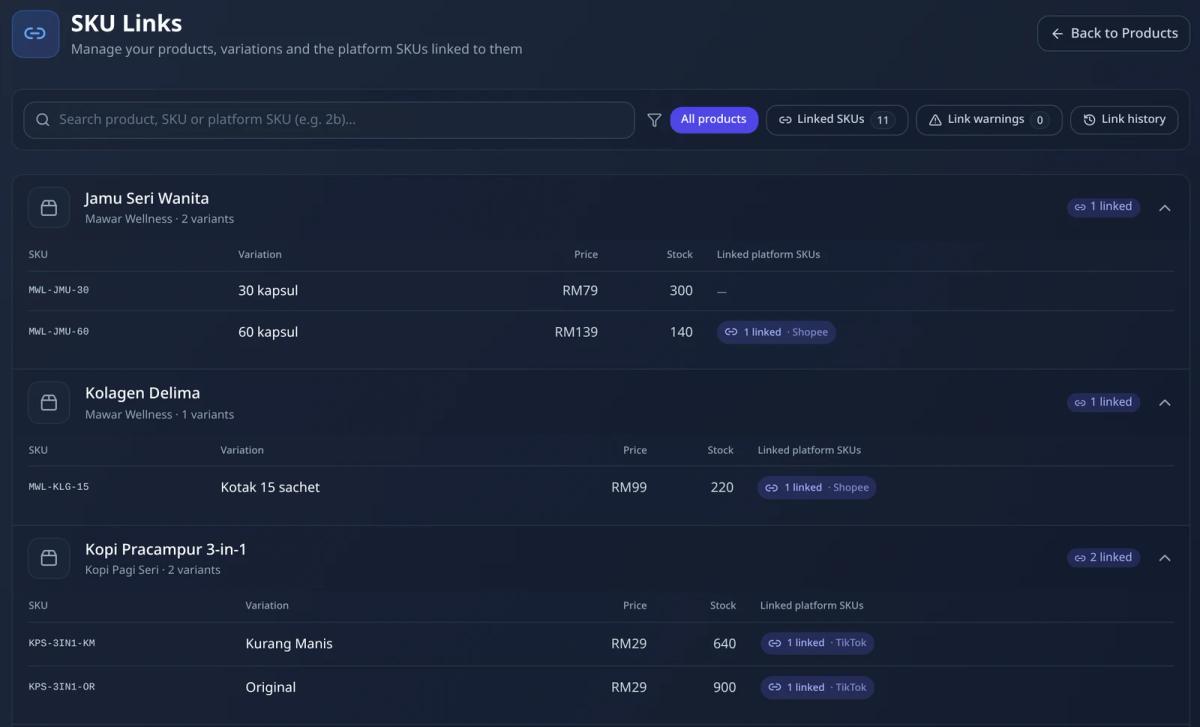
For channel mapping, the SKU Links page lists every product variation with its master SKU, price and stock, plus the marketplace SKUs linked to it. It also flags link warnings and keeps a link history, so you can spot a listing that isn’t connected before it causes a wrong deduction. Every stock movement is recorded in the stock log with the order number, SKU, quantity and reason, which makes it much easier to trace a count that doesn’t match the shelf.
Frequently asked questions
Should a bundle have its own SKU?
Yes. A bundle needs its own SKU so it can be listed, sold and reported on as one product. What it shouldn’t have is its own separate stock count. Its availability should come from the stock of the items inside it.
How do I calculate stock for a bundle?
Divide each component’s stock by the quantity used per bundle, then take the lowest result. If a set needs one serum (420 in stock), one night cream (380) and one cleanser (610), you can sell 380 sets.
What’s the difference between a bundle and a variant?
A variant is one version of the same product, such as 30ml or 50ml, and has its own stock. A bundle is a combination of several products or several units sold together, and its stock depends on those products.
Should I pre-pack bundles or pack them per order?
Packing per order keeps your stock flexible, because the components can still be sold on their own. Pre-packing saves time for very popular sets, especially during campaigns. If you pre-pack, record the assembly as a stock movement so the components and the finished sets both stay accurate.
Sell more sets without losing track of stock
Bundles work best when your stock is counted at the item level and every channel points to the same SKUs. Luxana is a Malaysian order management system (OMS) that keeps orders from all your channels, products and bundles, stock, courier bookings and a built-in CRM with official WhatsApp in one place, so the customer and order data your team needs is never split across tools. If you’d like to see how your bundles and stock would look in one system, see how Luxana works.
Read also: How to Choose an Order Management System in Malaysia: The Complete Guide | Cara Urus Stok Bisnes Online Tanpa Terlebih Jual | Cara Kira Untung Bersih Bisnes Online | How to Set Up an E-commerce Packing Station

Run orders, couriers and WhatsApp in one place
Built for Malaysian online sellers. Set up in an afternoon.


