Order Processing Workflow for Online Stores: Order Statuses Explained, Step by Step (2026)
A practical guide for Malaysian online stores: the order statuses you need from New to Completed, exception statuses for orders that go wrong, a 7-step workflow setup, a daily order desk routine and the metrics worth tracking.
- Published
- Reading time
- 11 min read
- Language
- English

On this page 8 sections
- What is an order processing workflow?
- The core order statuses, explained
- Exception statuses: what to do when an order goes wrong
- How to set up your order workflow in 7 steps
- 1. Map where orders come from
- 2. Choose your statuses and write the exit rules
- 3. Give every status an owner
- 4. Set a daily cut-off time
- 5. Trigger actions from status changes
- 6. Make exceptions visible, with a reason and a deadline
- 7. Review stuck orders every day
- Order workflow metrics worth tracking
- Common order workflow mistakes
- How an OMS runs this workflow for you
- Read also
Quick answer: An order processing workflow is the fixed path every order follows from "new" to "completed", with a clear status at each stage. For most Malaysian online stores that means: New → Payment confirmed or COD verified → Processing → Ready to ship (AWB generated) → Packed → Picked up → In transit → Out for delivery → Completed. Add a small set of exception statuses (On hold, Cancelled, Failed delivery, Returned), give every status one owner and one exit rule, and review the stuck orders every day.
When a store is small, nobody needs order statuses. You remember every customer, and the "workflow" is a WhatsApp chat and a notebook. Then volume grows, a second admin joins, orders start coming in from a website, a form and chat at the same time, and the questions begin: Has this one been paid? Did we pack it? Why is this parcel still not shipped after three days?
Clear order statuses fix that. This guide explains what an order processing workflow is, the statuses most online stores need, how to handle the orders that go wrong, and how to set up a workflow your team can actually follow.
What is an order processing workflow?
An order processing workflow is the sequence of steps an order goes through after a customer buys, and the status that tells everyone where the order is right now. A good workflow answers three questions for every order at a glance:
- Where is it? (its current status)
- Who is responsible for moving it forward? (the owner of that status)
- What has to happen before it can move on? (the exit rule)
Without those answers, orders get stuck silently. A COD order waits for a verification call nobody makes. A paid order sits in "processing" because the item is out of stock and nobody flagged it. Customers notice before you do.
The core order statuses, explained
The exact names differ between systems, but most online stores in Malaysia need these stages. Treat this as a starting template and rename the statuses to match how your team talks.
| Status | What it means | Owner | Exit rule (move on when…) |
|---|---|---|---|
| New | Order received from any channel (website, form, chat, API) | Sales / admin | Details are complete and correct |
| Pending payment | Online payment or bank transfer not received yet | Sales / admin | Payment is confirmed, or the order is cancelled after your follow-up window |
| COD verification | Cash-on-delivery order needs a quick check | Sales / admin | Customer confirms name, address and phone, or the order goes on hold |
| Processing | Paid or verified; stock is reserved and the order is queued for shipping | Operations | Stock is available and a courier is assigned |
| Ready to ship | AWB / shipping label generated | Operations | Label printed and handed to packing |
| Packed | Parcel packed and scanned against the order | Packing team | Parcel is in the pickup area for its courier |
| Picked up | Courier has collected the parcel | Operations | Courier scan confirms pickup |
| In transit | Parcel is moving through the courier network | Courier (you monitor) | Courier marks it out for delivery |
| Out for delivery | Rider has the parcel today | Courier (you monitor) | Delivered, or a delivery attempt fails |
| Completed | Delivered and, for COD, cash collected | Finance / admin | Closed; ready for aftercare and repeat-order follow-up |
Two rules make this table work:
- One owner per status. If sales owns "Pending payment" and operations owns "Processing", nobody has to guess who should chase an order.
- Exit rules are facts, not feelings. "Payment confirmed" is a fact. "Probably fine" is not.
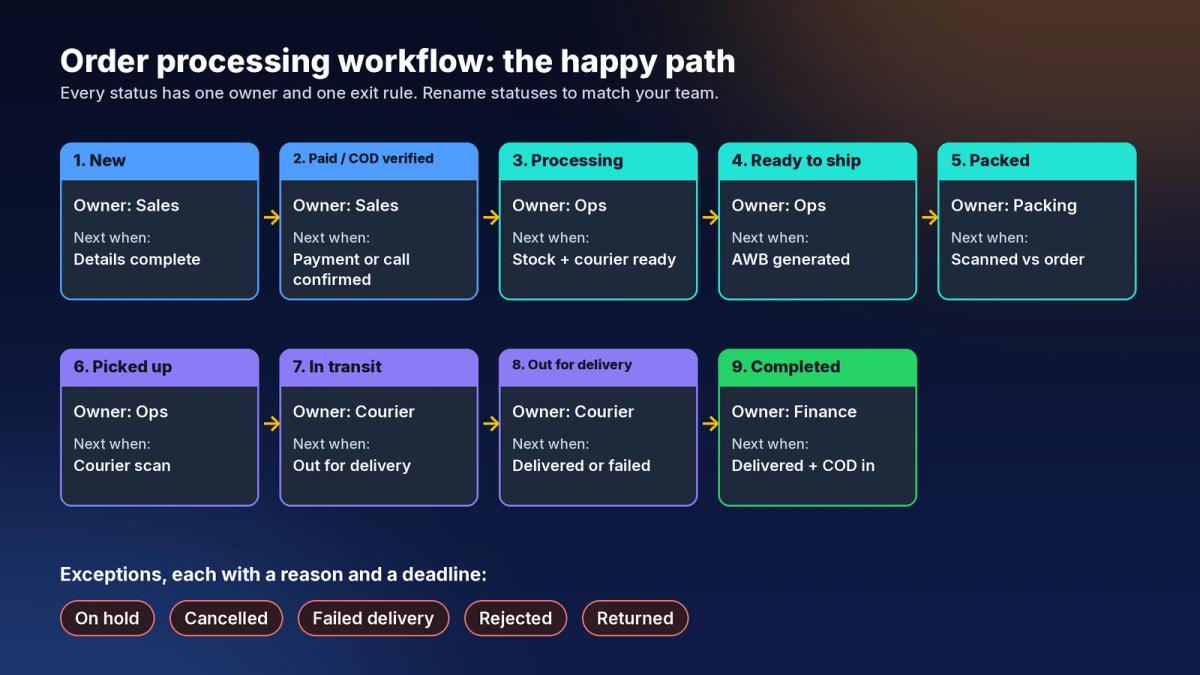
Tip: Keep payment and fulfillment separate. "Paid" tells you about money; "Packed" tells you about the parcel. Mixing them in one status is how paid orders get forgotten on a shelf.
Exception statuses: what to do when an order goes wrong
The happy path is the easy part. Most of the daily stress in an online store comes from the orders that leave it. Give each exception its own status so it's visible, and decide in advance what happens next.
| Exception status | Typical cause | What to do next |
|---|---|---|
| On hold | Address unclear, stock missing, customer asked to change the order, suspected fake order | Record the reason. Set a time limit to resolve it, then release or cancel |
| Cancelled | Customer cancelled, payment never arrived, COD verification failed | Release reserved stock and keep the cancellation reason for reporting |
| Failed delivery | Customer not home, phone unreachable, wrong address | Contact the customer quickly and arrange redelivery before it turns into a return |
| Rejected | Customer refused the parcel at the door (often COD) | Note the reason and watch for repeat refusals from the same customer |
| Returned | Parcel came back to you | Inspect, restock or write off, and record the reason (wrong item, damage, refusal) |
The reason field matters more than the status itself. "Returned" tells you that something went wrong; "returned because wrong variant was packed" tells you which part of your workflow to fix.
How to set up your order workflow in 7 steps
1. Map where orders come from
List every place an order can start: your website, an order form, WhatsApp chats, social media DMs, a reseller or agent. Each source should land in the same order list with the same starting status. If one channel lives in a separate spreadsheet, it will always be the one that gets missed.
2. Choose your statuses and write the exit rules
Start with the table above and remove what you don't need. A store that only sells with online payment doesn't need a COD verification step. Write one sentence for each status that says exactly when an order can move on.
3. Give every status an owner
Put a name or a role next to each status. In a small team one person may own several statuses, and that's fine, as long as it's written down.
4. Set a daily cut-off time
Decide the time by which an order must be confirmed to ship the same day, based on your couriers' pickup times. Everything that is verified before the cut-off is processed today; everything after rolls to tomorrow. This one rule removes a lot of "can we still send this today?" messages.
5. Trigger actions from status changes
Each status change is a natural moment to do something automatically:
- Pending payment → payment reminder
- Ready to ship → AWB generated in a batch with the other orders for the same courier
- In transit → tracking number sent to the customer on WhatsApp
- Out for delivery → "your parcel arrives today" message to reduce failed deliveries
- Completed → thank-you or aftercare message, then a repeat-order follow-up later
When actions hang off statuses, you stop relying on someone remembering to send a message.
6. Make exceptions visible, with a reason and a deadline
Every order on hold should show why it's on hold and since when. A good rule of thumb: nothing sits in an exception status without someone working on it. Agree on how long each exception may stay open before it is escalated, released or cancelled.
7. Review stuck orders every day
Once a day, check every status for orders that have been there too long. The checklist below is a simple routine to start with.
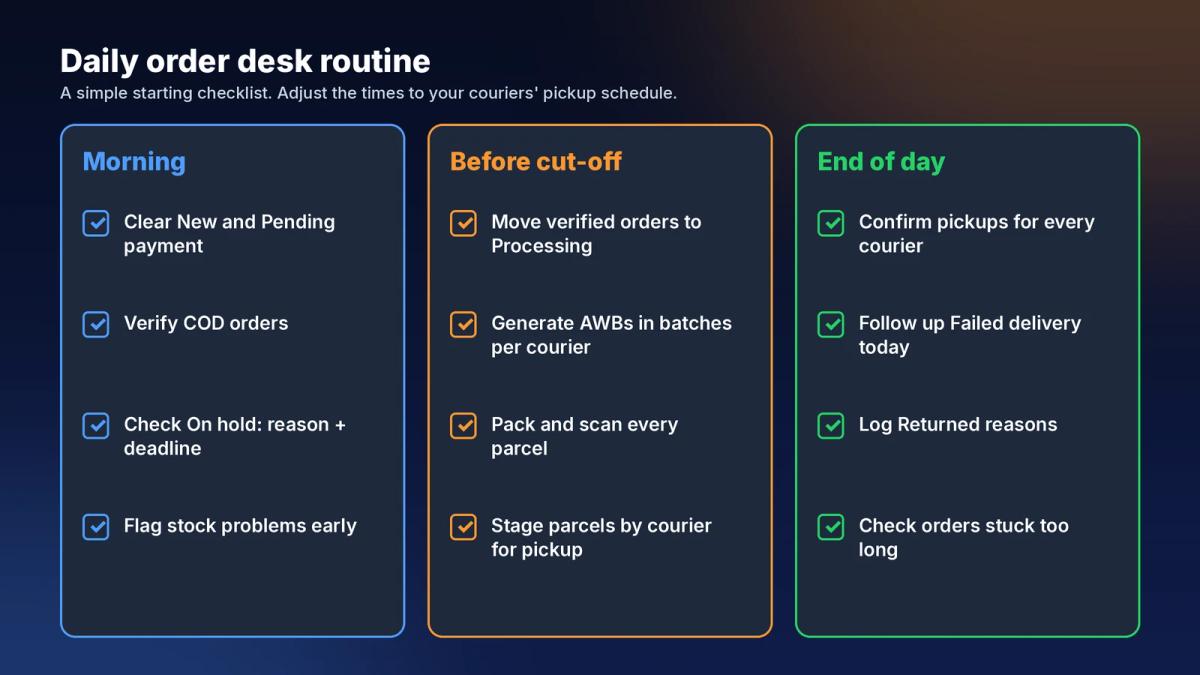
Order workflow metrics worth tracking
You don't need a big dashboard. These numbers, reviewed weekly, show where your workflow is leaking:
- Order-to-ship time: how long from "New" to "Picked up". Rising times usually point to a bottleneck in verification or packing.
- Orders older than your target in each status: the clearest signal that something is stuck.
- Cancellation rate and reasons: high cancellations before shipping often mean slow confirmation or stock problems.
- Failed delivery and return rate: especially for COD; see which reasons repeat.
- Orders packed per person or per station: helps you plan staff for campaigns and peak days.
Set your own targets from your own data. What's normal depends on your product, your courier mix and how much of your volume is COD.
Common order workflow mistakes
- Too many statuses. If your team can't remember what each status means, they'll pick the wrong one. Fewer, clearer statuses beat a perfect but confusing list.
- Statuses updated by hand, late. If someone updates statuses at the end of the day from memory, the list is wrong all day. Update statuses at the moment the work happens, ideally from a scan or a system event.
- No reason on exceptions. "On hold" with no note becomes a mystery order a week later.
- Separate lists per channel. Orders from chat in one place and website orders in another means two workflows, two sets of mistakes.
- Customers learn about problems first. If the customer asks "where's my parcel?" before you know it failed, your exception handling is too slow.
How an OMS runs this workflow for you
A spreadsheet can track statuses for a while, but it can't move orders on its own, warn you when something is stuck, or message customers when a status changes. That's what an order management system (OMS) is for.
In Luxana, orders from your connected channels land in one order list, split into status tabs, with payment and courier details for each order. An attention bar at the top flags orders that need action: sync issues, high-risk orders and orders on hold, so exceptions don't hide inside a long list.
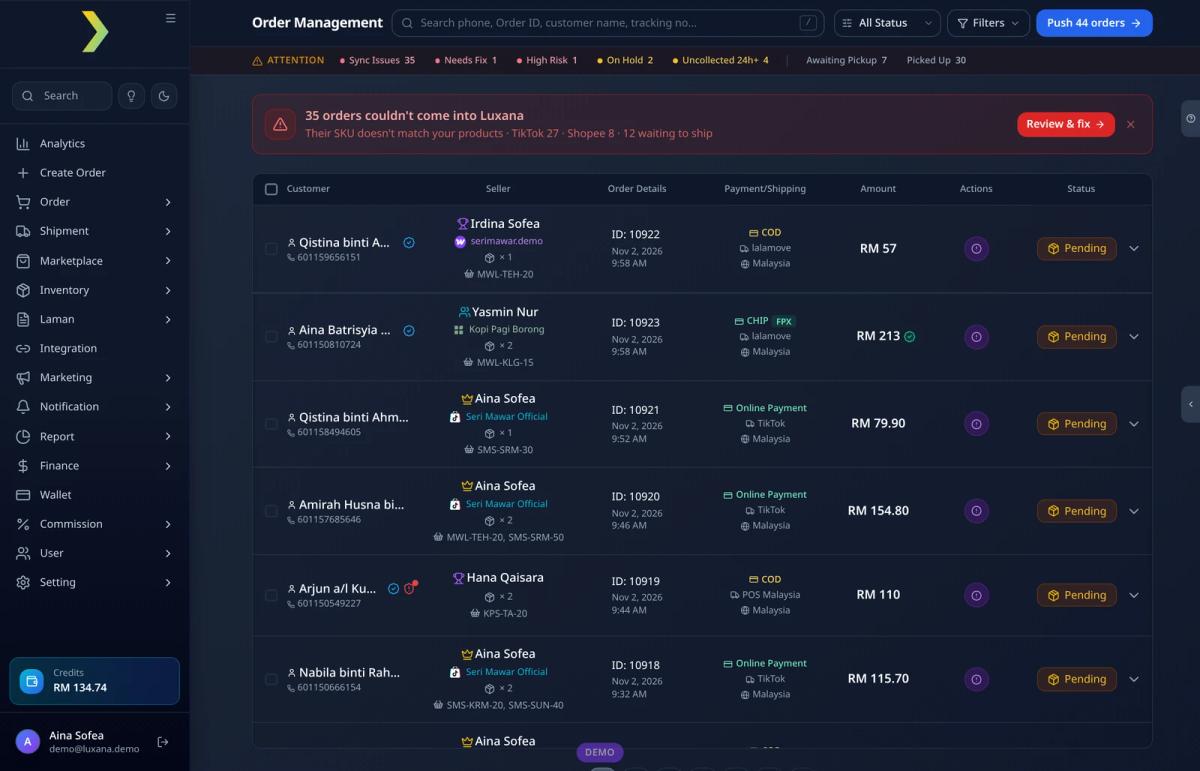
From there, the rest of the workflow runs in the same system:
- Order capture from chat: AI Paste turns a customer's WhatsApp message into a filled-in order, so chat orders enter the same workflow as website orders.
- Courier and AWB: orders can be pushed in batches grouped by courier, with the AWBs ready to download and print.
- Packing: the packing view shows orders pushed, parcels scanned and parcels still awaiting scan for each courier.
- Customer updates: order status events such as New Order, Pending, Picked Up, In Transit, Out for Delivery, Completed, Returned, Rejected and Failed Delivery can trigger WhatsApp notifications through the official WhatsApp Business API.
- Customer history: because the CRM is built into the OMS, each customer's order history sits next to their chats, which helps when you're deciding what to do with a failed delivery or a repeat refusal.
The goal isn't more software. It's that every order has one status, one owner and one next step, and that you see the stuck ones before your customers do.
What is the difference between order processing and order fulfillment?
Order processing covers everything from receiving an order to getting it ready to ship: checking details, confirming payment or COD, reserving stock and assigning a courier. Fulfillment is the physical part: picking, packing, handing over to the courier and delivery. In practice they are one continuous workflow, so it helps to manage them in one system.
How many order statuses should a small online store have?
Enough that everyone knows where each order is, and no more. Many small stores manage well with a short happy path (new, confirmed, processing, packed, shipped, completed) plus a few exception statuses such as on hold, cancelled and returned. Add more only when a real problem needs its own stage.
Who should update the order status?
Whoever does the work, at the moment they do it. Better still, let the system update it from an event: a payment confirmation, a packing scan or a courier tracking update. Manual updates at the end of the day are where most status errors come from.
What should I do with orders stuck in "On hold"?
Give every on-hold order a reason and a deadline. Review the list daily, fix what you can (confirm the address, restock, call the customer) and cancel what can't be fixed, so stock isn't reserved for orders that will never ship.
Do COD orders need a different workflow?
They usually need one extra step: a quick verification of the customer's name, address and phone before shipping, and a "cash collected" check before the order counts as completed. Failed deliveries and refusals are also more common with COD, so make those exception statuses easy to see.
Read also
- How to Choose an Order Management System in Malaysia: The Complete Guide
- E-commerce Order Fulfillment in Malaysia: The Complete Guide
- WhatsApp Order Notifications: How to Automate Order Updates for Your Online Store
- What Is an AWB? How to Print Shipping Labels in Bulk
- Parcel Gagal Dihantar? Cara Selamatkan Order Sebelum Jadi Return
- How to Set Up an E-commerce Packing Station That Ships Orders Faster
Luxana is a Malaysian order management system (OMS) that brings orders from all your channels, courier assignment, bulk AWBs, packing scans and a CRM with official WhatsApp into one place. If your order statuses still live in a spreadsheet and a group chat, see how Luxana runs the whole workflow.
- order-processing
- order-status
- order-management-system
- workflow
- cod

Run orders, couriers and WhatsApp in one place
Built for Malaysian online sellers. Set up in an afternoon.


