How to Choose an Order Management System in Malaysia: The Complete Guide (2026)
A complete buyer’s guide for Malaysian online sellers: signs you need an OMS, how to map your order flow, the 10 features that matter, Malaysia-specific requirements, demo questions, pricing models and a phased rollout plan.
- Published
- Reading time
- 17 min read
- Language
- English

On this page 12 sections
- What an order management system does (and what it does not)
- Signs you are ready for an OMS
- Step 1: Map your order flow before you look at any software
- The 10 features that matter most in an OMS
- 1. Multichannel order sync
- 2. Fast manual and chat order entry
- 3. Real-time stock across channels
- 4. Courier integration and auto routing
- 5. Bulk AWB and batch processing
- 6. Packing scan and manifests
- 7. COD, failed delivery and return handling
- 8. Built-in CRM and official WhatsApp
- 9. Reporting and true profit
- 10. Team roles, commissions and integrations
- Malaysia-specific requirements to check
- Questions to ask in every OMS demo
- Understanding OMS pricing and the total cost
- How to roll out a new OMS without disrupting shipping
- Common mistakes when choosing an OMS
- Where Luxana fits
- Frequently asked questions
- See whether Luxana fits your order flow
Picking an order management system (OMS) is one of the few software decisions that touches every part of an online business. It decides how orders come in, how stock moves, how fast parcels leave, what customers hear after they buy and whether you can trust your profit numbers. Choose well and the team handles twice the orders with the same people. Choose badly and you end up paying for software while still running half the business in spreadsheets.
This guide is for Malaysian online sellers who are comparing systems for the first time or replacing one that no longer fits. It covers how to tell whether you are ready, how to map your own order flow before any demo, the 10 features that matter most, the Malaysia-specific requirements generic tools often miss, the questions to ask vendors, how to think about cost, and how to roll out a new OMS without disrupting shipping.
What an order management system does (and what it does not)
An order management system pulls orders from every place you sell into one list, then carries each order through the steps that follow: approving it, deducting stock, choosing a courier, printing the airway bill (AWB), packing, handing over to the courier and keeping the customer updated. If the idea is new to you, start with our Malay explainer Apa Itu Sistem OMS or the shorter English overview of order management systems in Malaysia.
It helps to know where an OMS ends and other tools begin, because many vendors blur the lines:
| Tool | Main job | Where it overlaps with an OMS |
|---|---|---|
| Order management system (OMS) | Orders from all channels through to delivery: stock, courier, AWB, packing, customer updates | This is the core system the others plug into |
| Inventory software | Stock levels, SKUs, purchasing | Most OMS platforms include stock, so a separate tool is often unnecessary for small and mid-sized sellers |
| Warehouse management system (WMS) | Bin locations, put-away and picking inside a large warehouse | Useful for big warehouses; many sellers only need the packing and scanning that an OMS provides |
| CRM | Customer records, segments and follow-ups | Works best when it reads the same order data, which is why some OMS platforms build it in |
| Accounting software | Invoices, ledgers, tax and financial statements | An OMS feeds sales and cost data in; it does not replace your accountant's books |
Signs you are ready for an OMS
You do not need an OMS on day one. A spreadsheet and the WhatsApp Business app are a fine way to start. But most growing sellers hit the same wall, usually somewhere between a few dozen and a few hundred orders a day. Watch for these signs:
- Orders arrive from three or more places, such as your website, landing pages, WhatsApp and a marketplace, and someone copies them into one sheet every day.
- You oversell because stock is updated by hand, after the fact.
- Choosing a courier and printing AWBs takes hours, one order at a time, across several courier portals.
- Wrong items and missed parcels keep happening in the packing area.
- COD returns are eating your margin and nobody can say exactly how many failed last month, or why.
- You cannot answer “are we profitable?” until the end of the month, if at all.
- Adding more orders means adding more staff at almost the same rate.
If three or more of these apply, it is time. Our comparison of Excel vs sistem OMS (in Malay) walks through the tipping point in more detail, and how to scale from 100 to 1,000 orders a day without adding staff shows what changes once the system does the repetitive work.
Step 1: Map your order flow before you look at any software
The most common mistake is starting with vendor websites. Every OMS looks good on its own homepage. Start with your business instead, and write down the answers to these questions:
Map your order flow
- Where do orders come from today? List every channel and roughly what share of orders each one brings.
- How do customers pay? Note the split between COD, online payment and bank transfer.
- Which couriers do you use, and how do you decide which courier gets which parcel?
- Who touches an order, from the admin who takes it to the packer who ships it? How many people, in how many roles?
- How do you pack today: one bench, several stations, or a separate warehouse team?
- What messages do customers get after they buy, and who sends them?
- Which reports do you need every week, and where do the numbers come from now?
This one page becomes your requirements list. It also stops you paying for features you will never use, and it shows vendors exactly what you need them to demonstrate.
The 10 features that matter most in an OMS
Not every feature carries the same weight. For most Malaysian online sellers, these ten decide whether the system actually removes daily work:
| # | Feature | What to check |
|---|---|---|
| 1 | Multichannel order sync | Every channel you sell on flows into one order list automatically |
| 2 | Fast manual and chat order entry | WhatsApp and phone orders can be keyed in without retyping every detail |
| 3 | Real-time stock across channels | One stock pool, deducted by every order, with a movement log |
| 4 | Courier integration and auto routing | Rules choose the courier; tracking numbers come back automatically |
| 5 | Bulk AWB and batch processing | Push and print AWBs for a whole batch, grouped by courier |
| 6 | Packing scan and manifests | Each parcel is scanned and handed over on a manifest |
| 7 | COD, failed delivery and return handling | Failed and returned parcels are tracked, and returns go back into stock |
| 8 | Built-in CRM and official WhatsApp | Customer history and automated messages run on the same order data |
| 9 | Reporting and true profit | Net profit after courier, COD, fees and ads, by channel, product and seller |
| 10 | Team roles, commissions and integrations | User permissions, seller or agent commissions, and an API for anything else |
1. Multichannel order sync
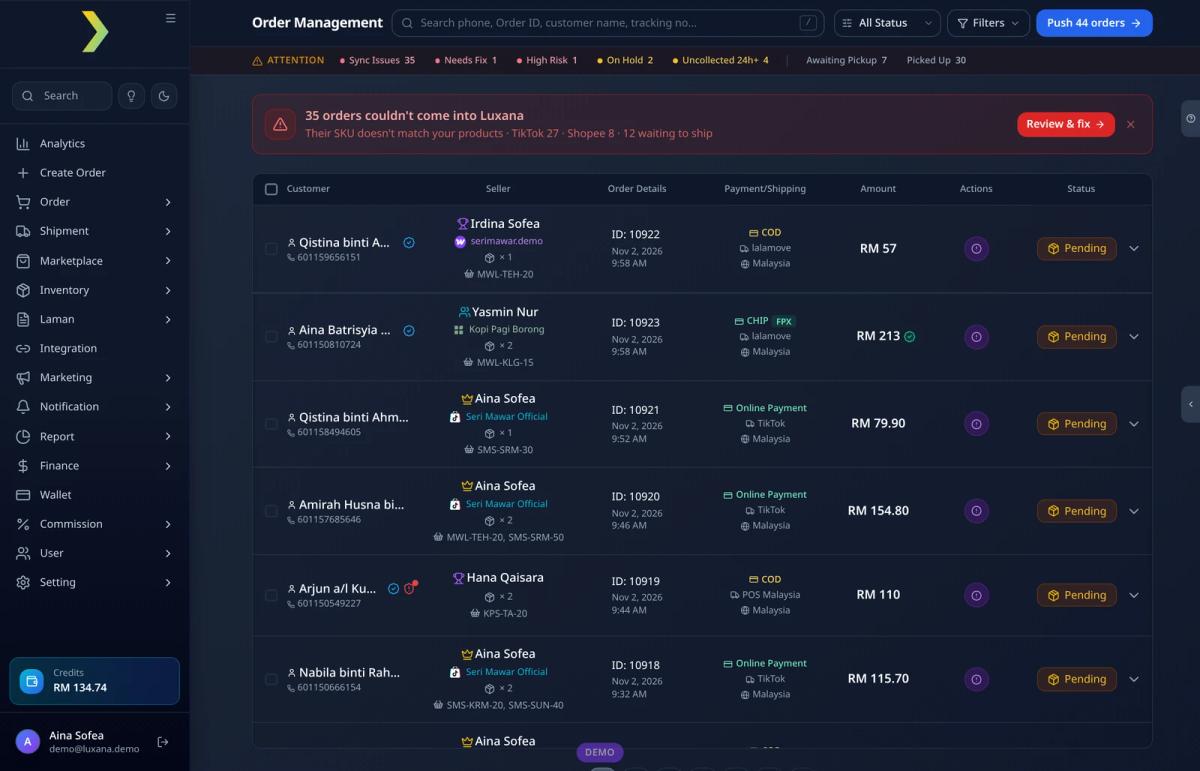
This is the foundation. Orders from your website, landing pages, payment forms and marketplaces should land in one list without anyone exporting or importing files. Ask how each channel connects (a plugin, an API, a connect code), how quickly orders appear, and what happens when an order cannot sync, for example because a SKU does not match your product list. A good system flags those orders instead of silently dropping them. Read more in how to sync orders into one dashboard.
2. Fast manual and chat order entry
In Malaysia, a large share of orders still starts in a WhatsApp chat. If your admins have to retype each customer’s name, phone number and address into the system, you lose time and introduce typos that later turn into failed deliveries. Check how quickly an admin can create an order from a chat message. In Luxana, AI Paste fills in the customer details from a pasted message, so the order is ready in seconds.
3. Real-time stock across channels
Stock should live in one place and move whenever an order moves, no matter which channel it came from. Ask when stock is deducted (on order, on approval or on shipping), how bundles and variants are handled, and whether there is a log that shows every change and who made it. Our Malay guide to managing stock without overselling explains the options.
4. Courier integration and auto routing
Most sellers use more than one courier, for price, coverage or reliability. The OMS should connect to the couriers you use, bring tracking numbers back automatically and, ideally, choose the courier for you based on rules such as state, weight, sales channel or postcode, with a backup courier when the first choice is unavailable. See our guide on how to choose couriers for an online business for what to look for on the courier side.
5. Bulk AWB and batch processing
Printing labels one by one does not scale. Check whether you can filter pending orders (by courier, payment type, state or product), push them to couriers as one batch and download all the AWBs together, already grouped by courier. This single feature often saves more time than anything else on the list.
6. Packing scan and manifests
Packing is where wrong items and missed parcels happen. A good OMS lets your team scan each parcel as it is packed, shows which pushed orders are still waiting, and creates a manifest per courier for handover. Our guides to setting up a packing station and reducing wrong packs (in Malay) show how this works on the floor.
7. COD, failed delivery and return handling
Generic, overseas-built order tools often treat COD as an afterthought. For many Malaysian sellers it is a big share of orders, and failed COD deliveries cost shipping both ways with no sale. Check whether the system tracks failed and uncollected parcels, helps your team follow up before a parcel is returned, records return reasons and puts good returned items back into stock. Read how to save parcels that fail delivery and how to reduce return parcels.
8. Built-in CRM and official WhatsApp
Once orders are in one system, you already hold the best customer data you have: who bought what, when and how often. If the CRM lives in a separate tool, someone has to keep the two in sync. If it is built into the OMS, segments such as repeat buyers or customers who have not ordered in a while come straight from purchase history. Make sure WhatsApp runs on Meta’s official WhatsApp Business Platform, not an unofficial tool that can get your number restricted. We cover this in WhatsApp CRM for online sellers, WhatsApp order notifications and our Malay guide to the WhatsApp Business API in Malaysia.
9. Reporting and true profit
Sales reports are easy. Profit reports are not, because profit depends on product cost, courier fees, COD charges, platform and payment fees, packaging, returns and ad spend. Ask whether the system can show net profit by period, channel, product and seller, and where each cost comes from. Our Malay guide on how to calculate net profit for an online business shows which costs sellers most often forget.
10. Team roles, commissions and integrations
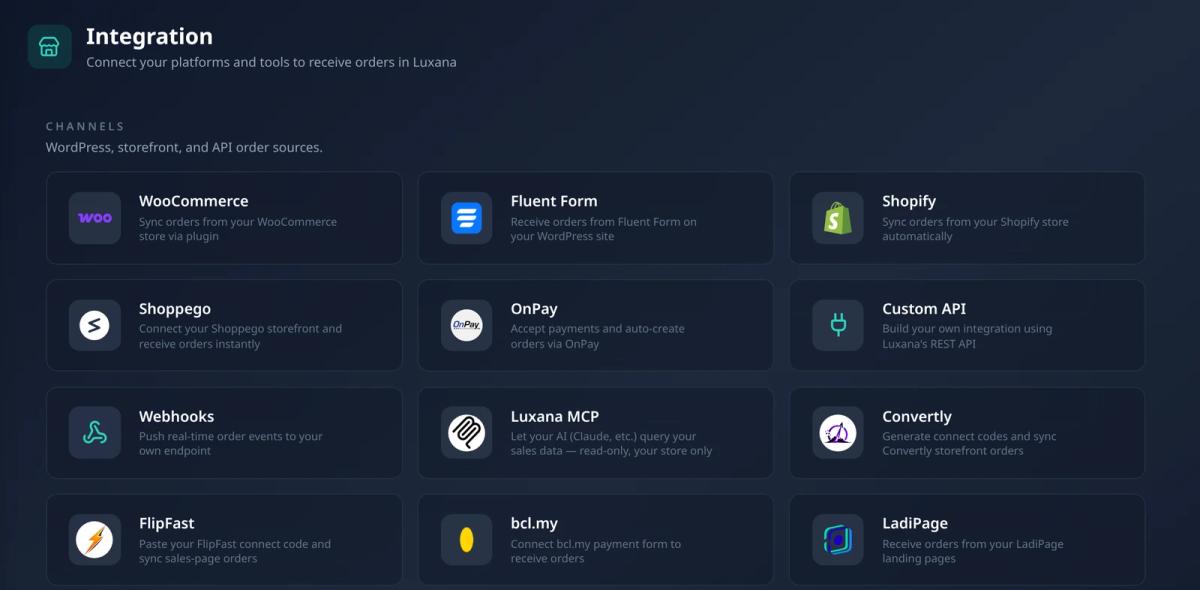
As the team grows, you need user roles so each person sees only what they should, and a clear record of who did what. Sellers who work with agents, resellers or a sales team also need commissions calculated from real orders. Finally, check how open the system is: a documented API and webhooks mean you can connect tools the vendor has not built an integration for yet.
Malaysia-specific requirements to check
Many order management tools are built for markets where almost every order is paid online and shipped by one or two national carriers. Malaysian e-commerce works differently, so add these to your list:
Malaysia checklist
- COD orders handled as a normal payment type, with tracking of collection, failures and returns
- Connections to the local couriers you actually use, not only international carriers
- Local payment gateways and forms common in Malaysia, such as FPX-based payment pages
- WhatsApp as a first-class channel for taking orders and updating customers
- Addresses, states and postcodes handled correctly for Malaysian deliveries
- Prices in ringgit and support available in Malay and English during your working hours
- A vendor that understands local selling models such as agents, dropshippers and resellers
Questions to ask in every OMS demo
A demo is a sales presentation unless you take control of it. Send the vendor your order flow map beforehand and ask them to show you these things live, ideally with a few of your own real orders:
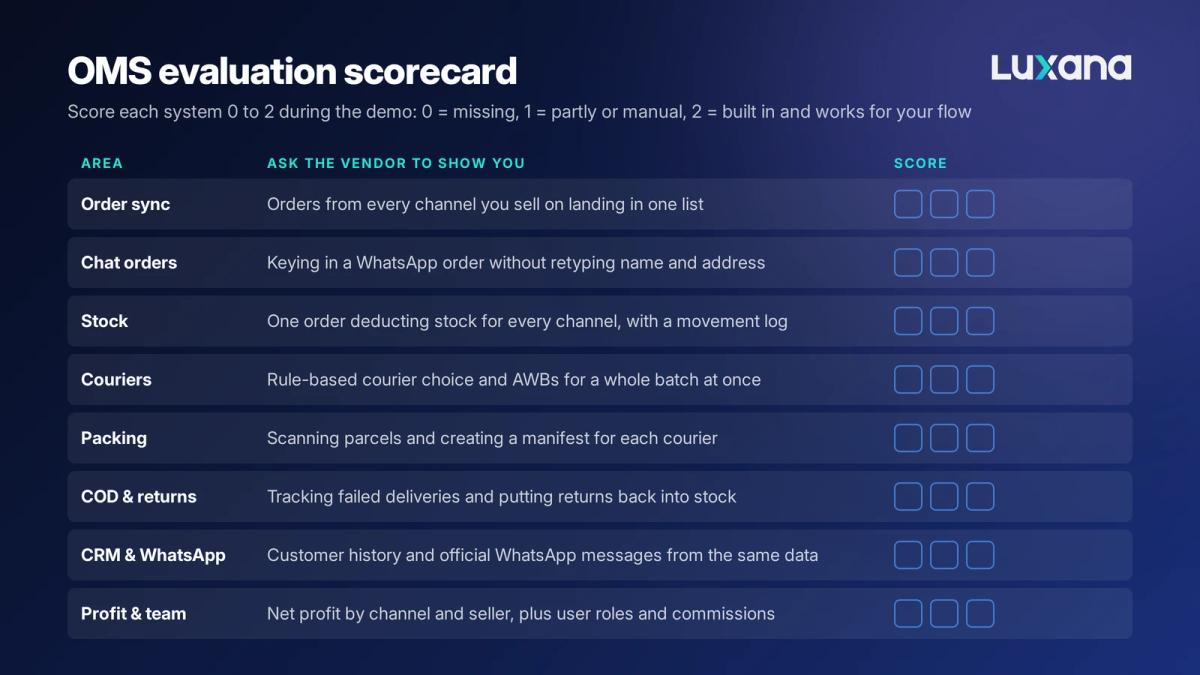
- “Show me an order from each of my channels arriving in the system.” Watch what happens when an order fails to sync.
- “Create an order from this WhatsApp message.” Time it.
- “Push 50 orders to two different couriers and print the AWBs.” Count the clicks.
- “What happens to stock when an order is cancelled or returned?”
- “Show me net profit for last month by channel.” Ask where each cost comes from.
- “How do I send an order update on WhatsApp, and is it the official API?”
- “How do I get my data out if I leave?” You should be able to export orders, customers and products.
- “Who helps us during setup, and how fast does support reply on a busy day?”
Understanding OMS pricing and the total cost
OMS vendors price in different ways, so compare the total monthly cost at your real order volume, not the headline number. Common pricing models include:
| Pricing model | How it works | Watch out for |
|---|---|---|
| Flat subscription | A fixed monthly or yearly fee, often in tiers | Tier limits on orders, users or channels that push you up a plan |
| Per order or per transaction | A fee for each order processed | Costs rising quickly during sales campaigns and peak seasons |
| Per user | A fee for each team member | Paying for occasional users such as packers or part-timers |
| Credits or usage top-up | Prepaid credits used for certain actions or messages | Which actions use credits and how fast they run out |
Then add the costs that sit outside the subscription: setup or onboarding fees, add-on modules, Meta’s charges for WhatsApp template messages (which depend on the message category and the customer’s country and can change), courier rates, and the staff time needed to migrate and train. Set this against the hours the system saves every day. A cheaper tool that still leaves your team copying data by hand is rarely the cheaper option.
How to roll out a new OMS without disrupting shipping
A phased rollout plan
- Clean your product list first: one SKU per sellable item, with bundles and variants defined.
- Connect one sales channel and run it alongside your old process for a few days to check that orders and stock match.
- Set up couriers, routing rules and AWB printing, then test a small batch end to end.
- Train the packing team on scanning and manifests before switching the whole floor over.
- Connect the remaining channels one at a time.
- Turn on customer messages, starting with order confirmations and shipping updates.
- Review the first month's reports with the team and adjust rules, roles and templates.
Common mistakes when choosing an OMS
- Choosing on price alone. The real cost is the work the system does not remove.
- Buying for a feature list instead of your flow. A system with 200 features you do not use is harder to run, not better.
- Ignoring COD and returns. For many Malaysian sellers, this is where the money leaks.
- Keeping customer data in a separate tool. Every extra system means exports, imports and out-of-date segments.
- Skipping the hands-on test. Always test with your own orders, couriers and team.
- Not asking about data export. Make sure your orders and customers stay yours.
Where Luxana fits
Luxana is an order management system built in Malaysia for online sellers who take orders from several channels, including WhatsApp, and ship with several couriers. Orders, stock, courier routing, bulk AWB, packing scans and manifests, net profit reporting, seller commissions, and a CRM with official WhatsApp Business Platform integration all run in one system, on the same data.
For a real example of what this looks like at volume, frozen food seller PAK MAT WESTERN cut daily order sorting from 3 to 5 hours to about 15 minutes using Luxana’s courier routing, batch AWB and packing scans. Read the full story.
Luxana is not the right fit for everyone. If you run a large multi-site warehouse that needs bin-level put-away and picking, you may need a dedicated WMS alongside your OMS. Use the scorecard above, and judge Luxana on the same terms as every other system you look at.
Frequently asked questions
What is the best order management system in Malaysia?
There is no single best system for every seller. The best OMS is the one that handles your channels, payment mix, couriers and team with the least manual work. Shortlist two or three systems, test them with your own orders and compare them on the same scorecard.
How much does an order management system cost?
It depends on the pricing model (flat subscription, per order, per user or credits), your order volume and the modules you need. Ask each vendor for the total monthly cost at your real volume, including setup, add-ons and messaging charges.
Can a small business use an OMS?
Yes. Many sellers start using an OMS once orders come from more than one channel or once the team grows beyond one or two people. Starting earlier means you build clean habits for stock, couriers and customer data before volume makes the mess harder to fix.
Is an OMS the same as an ERP?
No. An ERP covers the whole company, including accounting, purchasing and HR, and usually takes longer to set up. An OMS focuses on getting orders from every channel through to delivery quickly and accurately. Most online sellers need an OMS long before they need an ERP.
How long does it take to set up an OMS?
It depends on how many channels, couriers and products you have, and how clean your product data is. A phased rollout, one channel and one courier at a time, keeps shipping running while the team learns the new system.
See whether Luxana fits your order flow
If you have mapped your order flow and want to see how it would run in one system, from the first chat or checkout to the parcel leaving your door, see how Luxana works. Bring your scorecard and your hardest week of orders, and judge it on the same terms as everything else.
Read also: E-commerce Order Fulfillment in Malaysia: The Complete Guide | Excel vs Sistem OMS: Bila Masa Bisnes Anda Patut Tukar? | WhatsApp CRM for Online Sellers | Cara Urus Stok Bisnes Online Tanpa Terlebih Jual

Run orders, couriers and WhatsApp in one place
Built for Malaysian online sellers. Set up in an afternoon.


